Conversational Memory with messages[]
📅 Published on: 27 January 2026
When you’re going to chat with your AI assistant, from one question to another it will forget what you’re talking about. So if you ask it to generate the code for an HTTP server, and in the next turn to modify it to add an endpoint, it won’t remember what it did in the previous turn.
First step: setting up conversational “memory”
If you remember our previous article (Baby steps with Genkit JS and Docker Model Runner), we had the following code for our discussion with the LLM:
  const { stream, response } = ai.generateStream({
    model: "openai/"+coderModelId,
    config: {
      temperature: 0.5,
    },
    system: `You are a helpful coding assistant.
    Provide clear and concise answers.
    Use markdown formatting for code snippets.
    `,
    messages: [
      { role: 'user',
        content: [{
          text: userQuestion
        }]
      }
    ]
  });
We’re going to use the messages[] array to maintain the conversation context. Each message in the array has a role (system, user, or model) and content.
with the OpenAI API, the
assistantrole is used instead ofmodel, but the@genkit-ai/compat-oaiplugin does the conversion automatically.
So here’s the modification made to our code to maintain the conversation context:
We’re going to “store” the conversation:
// Conversation history
let conversationHistory = [];
Then in the discussion loop, we’re going to add messages to the conversationHistory array:
- Add the user message (
user) before calling the model - Add the model’s response (
model) after receiving the response
  // Add user message to history
  conversationHistory.push({
    role: 'user',
    content: [{
      text: userQuestion
    }]
  });

  const { stream, response } = ai.generateStream({
    model: "openai/"+coderModelId,
    config: {
      temperature: 0.5,
    },
    system: `You are a helpful coding assistant.
    Provide clear and concise answers.
    Use markdown formatting for code snippets.
    `,
    messages: conversationHistory
  });

  let modelResponse = '';
  for await (const chunk of stream) {
    process.stdout.write(chunk.text);
    modelResponse += chunk.text;
  }

  // Add model response to history
  conversationHistory.push({
    role: 'model',
    content: [{
      text: modelResponse
    }]
  });
Here’s roughly how your conversation with the model will happen:
{role: 'user', content: '...'} History->>AI: Send entire history
messages: conversationHistory AI-->>History: Streamed response collected History->>-User: Display response Note over History: Response added
{role: 'model', content: '...'} end rect rgb(254, 249, 195) Note over User,AI: Turn 2 - Follow-up question User->>+History: New question added
{role: 'user', content: '...'} Note over History: History now contains:
user → model → user History->>AI: Send ALL history
(complete context) AI-->>History: Contextual response History->>-User: Display response Note over History: New response added
{role: 'model', content: '...'} end rect rgb(250, 245, 255) Note over User,AI: Turn N - Conversation continues User->>+History: Contextual question Note over History: Complete history:
user → model → user → model → ... History->>AI: Full context transmitted AI-->>History: Coherent response History->>-User: Display end
- Before each call: User message is added to history
- During the call: COMPLETE history is sent to the model
- After response: Model’s response is added to history
- Each turn: History grows and maintains entire context
With this approach, your AI assistant will be able to remember the entire conversation and respond coherently at each turn.
But there’s a catch: the context size
Our LLM has a context window, which has a limited size. This means that if the conversation becomes too long… It will bug out.
This window is the total number of tokens the model can process at once, like a short-term working memory. 👀📝 read: ibm post.
By default this size is set to
4096tokens for LLM engines that power local LLM, like Docker Model Runner, Ollama, Llamacpp, …
This window includes everything: system prompt, user message, history, injected documents and the generated response. 👀📝 read: redis post
Example: if the model has 32k context, the sum (input + history + generated output) must remain ≤ 32k tokens. 👀📝read: matterai post
Memory management strategies
To avoid these little inconveniences you can:
- Limit the number of messages in memory (this is what we’ll use today)
- Increase the context window size (we’ll see later how to do this with Docker Compose)
- Do “context packing”: when reaching a certain limit, summarize old messages using an LLM to free up space while keeping the essential context. (this will be the subject of a future blog post)
- Manage conversation memory using RAG (Retrieval-Augmented Generation) by storing messages in a vector database and retrieving only relevant messages for each conversation turn. (this will also be the subject of a future blog post)
- …
And of course, you can combine several of these strategies for optimal conversational memory management.
Limiting the number of messages in memory
To limit the number of messages in memory, we’re going to define a MAX_HISTORY_MESSAGES constant that will define the maximum number of messages (user + model) to keep in history.
const MAX_HISTORY_MESSAGES = 6; // 3 user messages + 3 model responses
We’ll also add a function to approximate the number of tokens in the message history (to give us an idea). We’ll use a simple and empirical approximation (and not very precise): 1 token ≈ 4 characters.
function approximateTokenCount(messages) {
  let totalChars = 0;
  for (const message of messages) {
    for (const content of message.content) {
      totalChars += content.text.length;
    }
  }
  return Math.ceil(totalChars / 4);
}
Most importantly, automatic limitation of message history using slice(-MAX_HISTORY_MESSAGES) to keep only the last N messages:
  if (conversationHistory.length > MAX_HISTORY_MESSAGES) {
    conversationHistory = conversationHistory.slice(-MAX_HISTORY_MESSAGES);
  }
And at the end of each turn, we can display the approximate number of tokens in history to monitor the size:
  const tokenCount = approximateTokenCount(conversationHistory);
  console.log(`\n\n📊 Approximate tokens in history: ${tokenCount}`);
  console.log(`Messages: ${conversationHistory.length}`);
So now, your conversation should look like this:
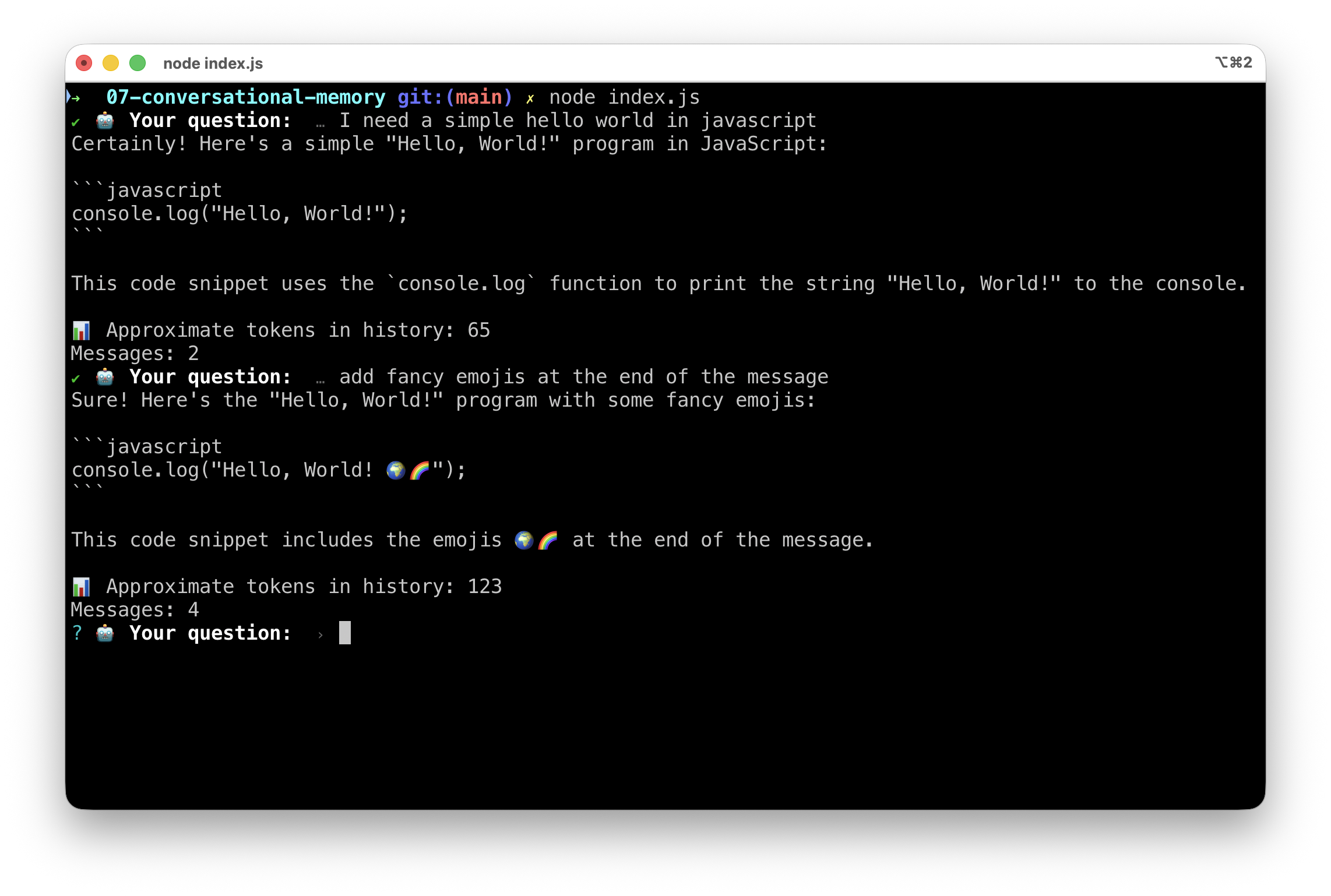
Increasing the context window size
If you want a longer message history, meaning more messages (e.g.: MAX_HISTORY_MESSAGES = 24), you’ll need to increase the model’s context window size. With Docker Agentic Compose, it’s very easy, you just need to modify the compose.yml file to add the context_size property under the model you’re using:
models:
  coder-model:
    model: hf.co/qwen/qwen2.5-coder-3b-instruct-gguf:Q4_K_M
    context_size: 8192
✋ But be careful, not all models support large context windows. Check the documentation of the model you’re using to know its capabilities.
✋ Important note: with small local models, it can be counterproductive to have too large a history, because the model will have difficulty “concentrating” on the current question, and it will also slow down its operation, which will be noticeable if you’re working with limited resources (CPU/RAM).
Complete code
import { genkit } from 'genkit';
import { openAICompatible } from '@genkit-ai/compat-oai';
import prompts from "prompts";

let engineURL = process.env.ENGINE_BASE_URL || 'http://localhost:12434/engines/v1/';
let coderModelId = process.env.CODER_MODEL_ID || 'hf.co/qwen/qwen2.5-coder-3b-instruct-gguf:Q4_K_M';

// Function to approximate token count
// Rule of thumb: 1 token ≈ 4 characters in English
function approximateTokenCount(messages) {
  let totalChars = 0;
  for (const message of messages) {
    for (const content of message.content) {
      totalChars += content.text.length;
    }
  }
  return Math.ceil(totalChars / 4);
}

const ai = genkit({
  plugins: [
    openAICompatible({
      name: 'openai',
      apiKey: '',
      baseURL: engineURL,
    }),
  ],
});

// Conversation history
let conversationHistory = [];

// Maximum number of messages to keep in history (user + model pairs)
const MAX_HISTORY_MESSAGES = 6; // 3 user messages + 3 model responses

let exit = false;

while (!exit) {
  const { userQuestion } = await prompts({
    type: "text",
    name: "userQuestion",
    message: "🤖 Your question: ",
    validate: (value) => (value ? true : "😡 Question cannot be empty"),
  });

  if (userQuestion === '/bye') {
    console.log("👋 Goodbye!");
    exit = true;
    break;
  }

  // Add user message to history
  conversationHistory.push({
    role: 'user',
    content: [{
      text: userQuestion
    }]
  });

  const { stream, response } = ai.generateStream({
    model: "openai/"+coderModelId,
    config: {
      temperature: 0.5,
    },
    system: `You are a helpful coding assistant.
    Provide clear and concise answers.
    Use markdown formatting for code snippets.
    `,
    messages: conversationHistory
  });

  let modelResponse = '';
  for await (const chunk of stream) {
    process.stdout.write(chunk.text);
    modelResponse += chunk.text;
  }

  // Add model response to history
  conversationHistory.push({
    role: 'model',
    content: [{
      text: modelResponse
    }]
  });

  // Limit history to MAX_HISTORY_MESSAGES
  if (conversationHistory.length > MAX_HISTORY_MESSAGES) {
    conversationHistory = conversationHistory.slice(-MAX_HISTORY_MESSAGES);
  }

  // Display approximate token count
  const tokenCount = approximateTokenCount(conversationHistory);
  console.log(`\n\n📊 Approximate tokens in history: ${tokenCount}`);
  console.log(`Messages: ${conversationHistory.length}`);

}
Conclusion
That’s all for today. In the next article, we’ll see how to do “context packing” to summarize old messages and free up space in the context window while keeping the essential context of the conversation. Stay tuned!