“Micro” Vibe Coding with Docker Agent and Qwen3 Coder 30b
My “passion”: playing with small local language models and seeing how they can be useful to me — translation, press reviews, text summarization, tutorial generation, …
I run my experiments on 2 machines:
- a MacBook Pro M2 Max with 32GB RAM
- a MacBook Air M4 with 32GB RAM
I can’t really complain, these are already powerful machines, more than capable of running small local language models. Still, I hit walls pretty fast.
With a model like Qwen 3.5 4b with 4-bit quantization (Q4_K_M), I can do text summarization, translation, press reviews — and it runs at a fairly comfortable pace.
Of course, the longer the prompt and conversation history, the slower the model gets, but it’s still decent. And as a bonus, I’m burning tokens I would have wasted with my Claude.ai subscription, so that’s rather nice.
But for code generation, even simple stuff, it’s nowhere near sufficient.
✋ I use “my small models” with Docker Agent, so the temptation to vibe code is strong — and it always ends in failure (which is expected).
So I can ask simple things like:
- “Explain the concept of struct in Golang”
- “How do I add a method to a struct in Golang”
- “Give me an example of pattern matching in Rust”
- “I need a hello world in Swift”
- …
First experiments and failures
But some days I don’t feel like thinking too hard, and I’d love to just say (to save time and out of sheer laziness): “Generate me a Node.js webapp to manage everything in my fridge — each item should have an expiry date, a name, a quantity, and a category. I want to be able to add, delete, and edit items, and search by name or category. I also want a web interface to manage all of this.”
With Qwen 3.5 4b with 4-bit quantization (Q4_K_M), it’s a lost cause. The model will do its best to answer the request, but it quickly gets overwhelmed by the complexity of the task and generates code that doesn’t work. You might think about crafting a complex prompt to help it, but don’t forget — our enemy is the model’s context window… and our machine, so it’s going to be slow and pointless.
I then tried with Qwen 3.5 9b with 4-bit quantization (Q4_K_M) — the code was slightly better (but still needed tweaking to actually work), but it took forever, and it brought my machine to its knees (the 9b is hungry!). So a lot of effort for a very mediocre result.
And don’t even think about having a long conversation with the model, or asking it to modify the generated code. That’s a dead end too.
A few explanations
I did some rough estimates (gut feeling, internet research, and… conversations with Claude… ouch, the tokens 🤭) to figure out the headroom I have — or don’t have — depending on the model.
Memory footprint of Qwen 3.5 4b with a context size of 65,536 tokens:
| Component | Memory |
|---|---|
| Model Q4_K_M (4B, 32 layers) | ~3 GB |
| KV Cache (65,536 tokens) | ~2 GB |
| Estimated total | ~5 GB |
Memory footprint of Qwen 3.5 9b with a context size of 65,536 tokens:
| Component | Memory |
|---|---|
| Model Q4_K_M (9B, 32 layers) | ~6 GB |
| KV Cache (65,536 tokens) | ~2 GB |
| Estimated total | ~8 GB |
On top of that, add the runtime and overhead to run the model, macOS, and other processes. Plus the growing size of each conversation, and you run out of memory fast:
| Context | KV Cache |
|---|---|
| 32,768 tokens | ~1 GB |
| 65,536 tokens | ~2 GB |
| 131,072 tokens | ~4 GB |
| 262,144 tokens | ~8 GB |
- ✋ These figures are approximate, but they give you an idea of the memory requirements to run these models with a 65,536-token context window.
- The KV Cache (Key-Value Cache) is a fundamental optimization of the attention mechanism in transformers. The model reads the cache to perform attention over the full history without recomputing it. And this has a memory cost that scales linearly with context size, which is why memory requirements grow so fast.
Is there no hope left?
Is my crusade for promoting small local language models doomed to fail?
Not long ago, I heard about a new Qwen, focused on code: Qwen3-Coder 30b A3b
| Component | Memory |
|---|---|
| Model Q4_K_M (30.5B params, 48 layers) | ~19 GB |
| KV Cache (65,536 tokens) | ~6 GB |
| Estimated total | ~25 GB |
Note: The KV Cache is larger for Qwen3-Coder 30b due to the bigger model size and layer count, which requires more memory to store intermediate representations during inference.
So that leaves very little headroom on my machine. ✋ But did you notice the “A3b” in the model name? The Qwen3 Coder architecture is of the Mixture of Experts (MoE) type: 30.5B total parameters, 3.3B active per token, meaning that for each token processed, only a fraction of the model is activated — reducing memory and compute requirements.
So I gave it a shot. The first few seconds: pure amazement. The model is actually pretty fast on my machine, even faster than Qwen 3.5 9b — which is impressive. But very quickly, my machine became unstable and eventually froze completely, forcing a hard reboot. The headroom left by the model was simply too small. 😢
Is there really no hope?
I’m a little disappointed, but stubborn. So I decided to use a more aggressive quantization, switching to the Q3_K_M format (3 bits), which reduces the model’s memory footprint at the cost of some precision loss. New estimate:
| Component | Memory |
|---|---|
| Model Q3_K_M (48 layers) | ~14 GB |
| KV Cache (65,536 tokens, GQA×4) | ~6 GB |
| Estimated total | ~20 GB |
I gain 5 GB of headroom — which is not bad at all.
New attempt: this time, I’m back to a comfort level similar to Qwen 3.5 4b, but with significantly better overall generation capability.
I had to tweak a few settings in the Docker Agent configuration to make sure I don’t saturate my machine’s memory and keep things comfortable:
agents:
  root:
    model: qwen3-coder
    num_history_items: 30
    max_old_tool_call_tokens: 8000
    skills: true
    description: Bob
    instruction: |
      You are Bob, a useful AI coding expert

      IMPORTANT — Tool usage rules:
      - When you need to call a tool, use ONLY the structured tool-calling API.
      - Do NOT output tool invocations as text blocks such as <function=...> or <tool_call> tags.
      - The tool calling mechanism is handled automatically by the system. Just invoke the tool directly.
      - If a tool is unavailable, say so in plain text. Never fabricate tool output.

    toolsets:
      - type: shell
      - type: filesystem

models:

  qwen3-coder:
    provider: dmr
    model: huggingface.co/unsloth/qwen3-coder-30b-a3b-instruct-gguf:Q3_K_M
    temperature: 0.0
    top_p: 0.8
    presence_penalty: 0.0
    max_tokens: 32768

    provider_opts:
      top_k: 20
      repetition_penalty: 1.05
Note: I added the instruction block below because sometimes Qwen 3 Coder formats tool call results in a slightly odd way, which disrupts Docker Agent. By explicitly reminding it of the tool usage rules, I managed to avoid that problem:
IMPORTANT — Tool usage rules:
- When you need to call a tool, use ONLY the structured tool-calling API.
- Do NOT output tool invocations as text blocks such as <function=...> or <tool_call> tags.
- The tool calling mechanism is handled automatically by the system. Just invoke the tool directly.
- If a tool is unavailable, say so in plain text. Never fabricate tool output.
But, there’s always a but…
Despite the significant improvement in comfort and overall generation capability with Qwen3-Coder 30b in Q3_K_M quantization, there’s still a limitation to keep in mind: in terms of precision, when it comes to code generation, the model struggles to produce working code on the first try. It often generates code that needs tweaking, which can be frustrating.
I know I’ll never match Claude.ai quality on my machine with a local model, but I like things that are actually useful. So I decided to give my friend “Qwen Coder” a little helping hand. And that’s where I’m inventing 💡 the concept of “Micro Vibe Coding Augmented by Skills”. 🤭
Micro Vibe Coding Augmented by Skills
The idea is to give the agent (and the model) access to tools (skills) that compensate for its weaknesses in precise code generation. The skill acts as a code “template” with all the necessary guidance to make the generated code work on the first try. And Qwen 3 Coder is smart enough to adapt the code template to the request, and make the necessary adjustments to produce functional code.
Important and non-negotiable rules:
- Each skill must address a specific need (no “generic” skills). For example, one skill to generate a Node.js webapp, another for a Golang webapp, another for a Python CLI, etc.
- The skill must be precise and complete, with all the necessary guidance to ensure the generated code is functional. This increases the prompt size, but remember — we gained a few GBs of memory with Q3_K_M quantization, so slightly longer prompts are fine.
- Limit the conversation history size (num_history_items) to avoid saturating memory.
- Once code generation is done, restart a fresh conversation session to avoid a bloated history that could saturate memory. In theory, you can continue and ask the model to make additions, but starting from a new session also works (the model manages to understand the previously generated codebase and apply the requested changes).
- Be prepared to iterate on your skills to make them more effective — it’s an ongoing process.
Stay realistic: even with this approach, there are limits to what the model can do — don’t feed it a massive codebase to analyze.
You’ll find the skills I used in this repo:
- Go Web Application — Sparkles (Full CRUD)
- Node.js + HTMX Web Application — Sparkles (Full CRUD)
- Node.js + HTMX Web Application — Search (Full CRUD + Search)
In the same repository you’ll find my agent configuration:
As well as my devcontainer setup which you can adapt to your needs:
Tests
With this method, I’m getting some pretty interesting results. I still need to experiment and improve my skills, create new ones based on my needs, but I’m starting to have a local LLM coding agent that’s genuinely useful to me — one that saves me time on simple to moderately complex code generation tasks.
Note: for better skill discovery, I added the following to the agent’s instructions:
IMPORTANT — Skills usage rules:
- Skills are NOT npm packages, pip packages, or any external dependency. Never try to install them.
- Skills are local instruction files stored at `.agents/skills/{skill-name}/SKILL.md` in the project directory.
- When a skill name is mentioned (e.g. "node-webapp-sparkles") or when a user request matches a skill description, you MUST:
  1. Read the file `.agents/skills/{skill-name}/SKILL.md` using the read_file tool.
  2. Follow the instructions in that file exactly to complete the task.
- Never fabricate skill behavior. Always read the SKILL.md file first.
Of course, I’ll share my new skills and improvements whenever I think they could be relevant and useful to others.
First prompt with the “node-webapp-sparkles” skill
I tested this: “use the node-webapp-sparkles skill to generate a webapp for managing the content of my fridge, with features to add, delete, modify items by name or category, and a web interface to manage everything”.
I had working generated code in 3-4 minutes:
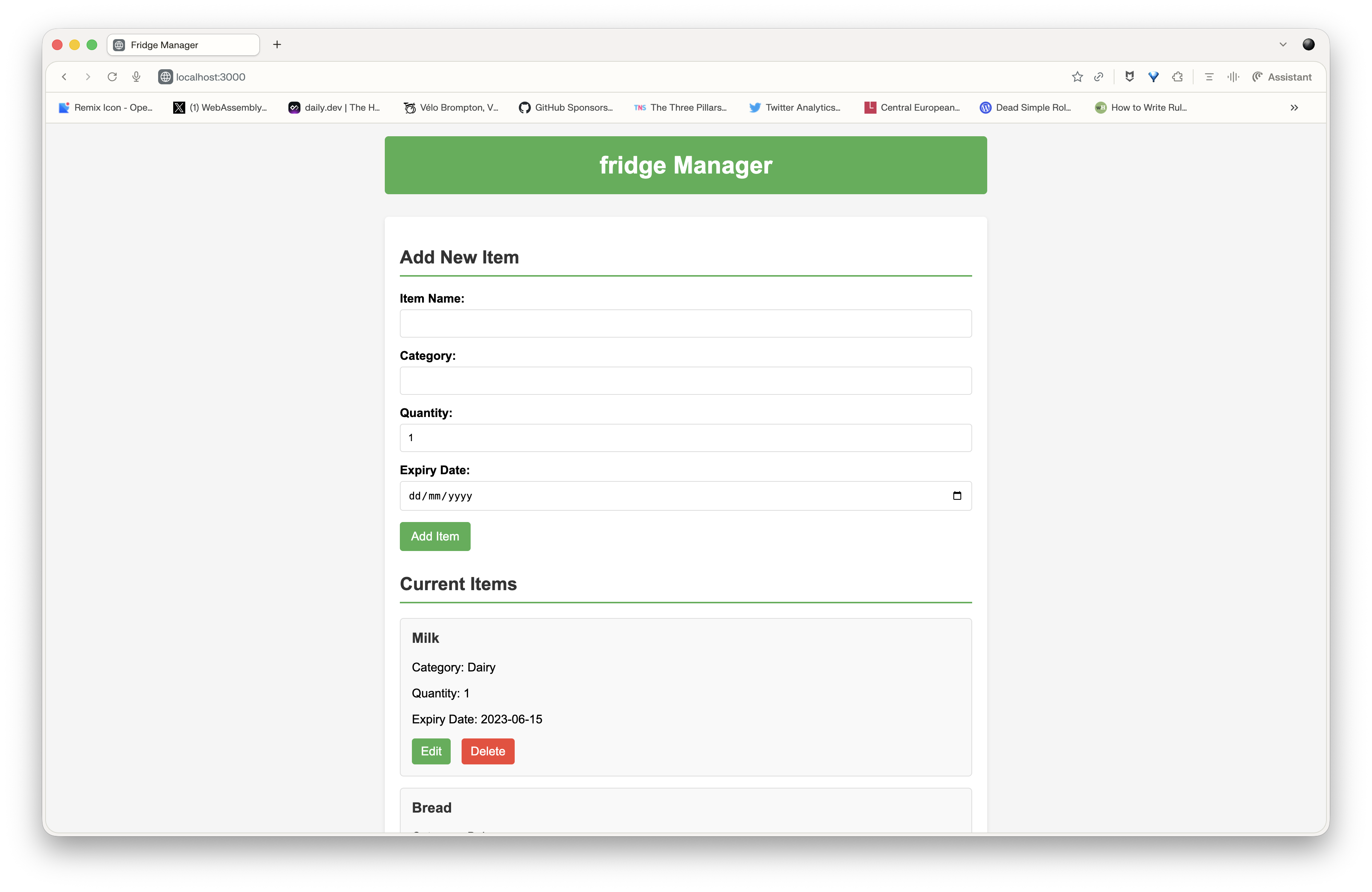
I then tried asking it to add a search feature. But the concept of search isn’t described in the skill, so I think it complicates the model’s job — and I got errors. So don’t stray outside your skill to make requests that aren’t described in it. Even if it seems obvious to you, the model isn’t as smart as you think — it needs precise guidance to generate working code on the first try.
New skill “node-webapp-search”
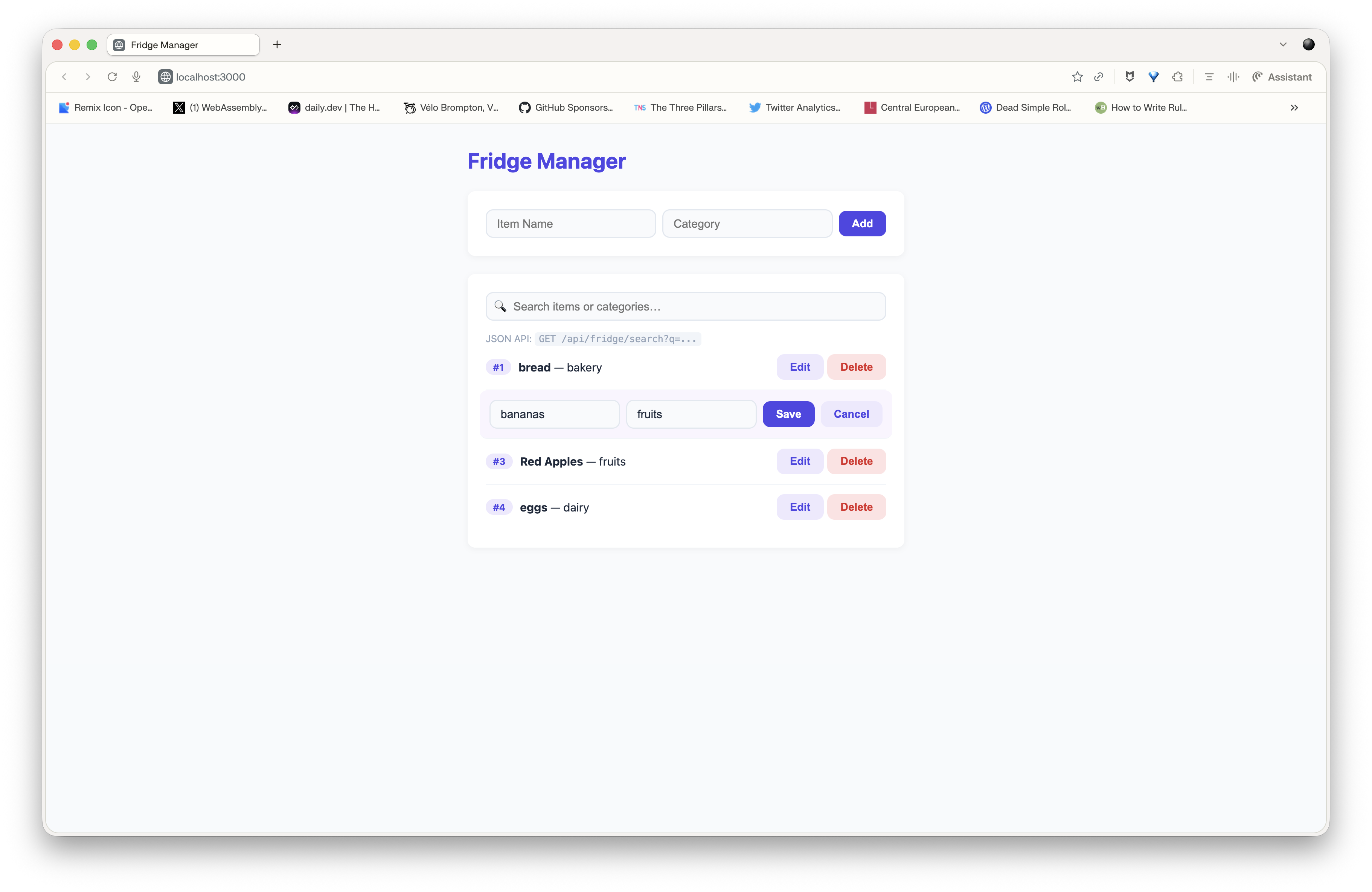
So I created a new skill, based on the previous one, but with explicit instructions to add a search feature by name or category. I tested this: “use the node-webapp-search skill to generate a webapp for managing the content of my fridge, with features to add, delete, modify and search items by name or category, and a web interface to manage everything”.
Code generation took slightly longer, but I got a first result that’s pretty satisfying (given my frontend dev level):
Conclusion
With the “Micro Vibe Coding Augmented by Skills” approach, I’ve managed to make my local Qwen 3 Coder 30b coding agent genuinely useful for simple to moderately complex code generation tasks. The range of possibilities and use cases for “small” local language models keeps growing every day, and I love it. Sure, Qwen 3 Coder isn’t that small 😉, but the MoE architecture let us cheat a little. I’d love to see some “4b A1b” models show up so I can test them on a Raspberry Pi.