pk, the TUI to build “coding helpers” - Part 2
Securing and adding knowledge
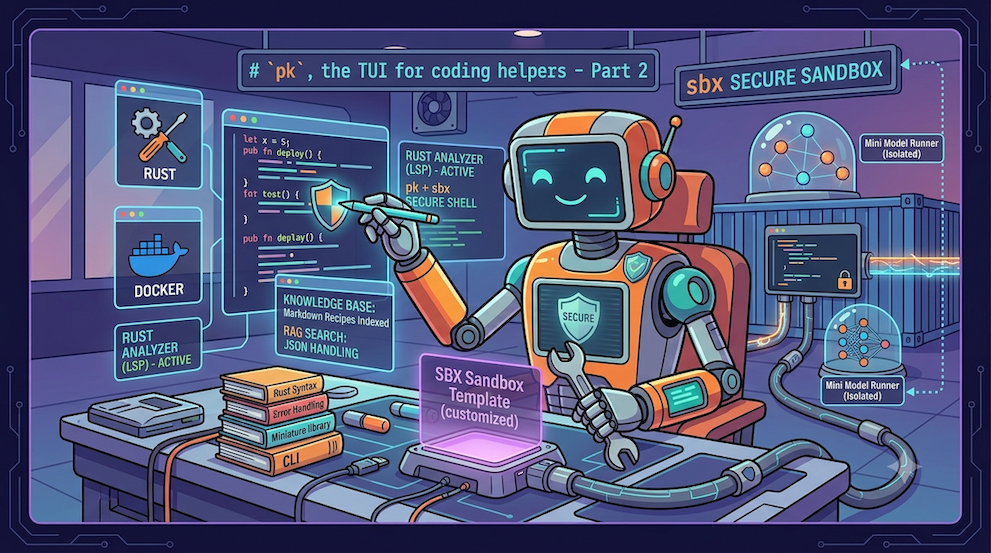
One thing you can’t skip when working with agents is running them in a secure environment. The agent must not access anything other than its working directory, and it must not be able to “see” your secrets / tokens / API keys… (the agent could very well leak your secrets onto the Net).
To secure my agents, I use Docker’s sandbox, sbx. There are of course other solutions, if only using a container, but don’t forget, you’ll need to set up a mechanism so that the agent can’t access your secrets. sbx already provides that.
One of the strengths of sbx is being customizable with templates and kits.
So, for our Bob agent, a Rust expert, I’m going to create a template that will let me, inside the sandbox:
- launch
pk(the TUI) - install the Rust dependencies (cargo, rustup, …)
- install code-server
That way, once started, the sandbox will contain everything Bob needs to help me code in Rust. And I’ll get a secure Web IDE accessible from my browser.
sbx template for Bob
You can find the template’s source code here: bob-template.
An sbx template is a Dockerfile:
ARG TAG=v0.4.2
FROM --platform=$BUILDPLATFORM k33g/pk:${TAG} AS coding-agent

FROM docker/sandbox-templates:shell

LABEL maintainer="@k33g_org"

ARG USER_NAME=agent

ENV TERM=xterm-256color
ENV COLORTERM=truecolor

ENV LANG=en_US.UTF-8
ENV LANGUAGE=en_US.UTF-8
ENV LC_COLLATE=C
ENV LC_CTYPE=en_US.UTF-8

USER root

RUN <<EOF
apt-get update
apt-get install -y wget curl build-essential xz-utils software-properties-common
rm -rf /var/lib/apt/lists/*
EOF

# ------------------------------------
# Install code-server
# ------------------------------------
ARG CODE_SERVER_VERSION=4.127.0

RUN curl -fsSL https://code-server.dev/install.sh | VERSION=${CODE_SERVER_VERSION} sh

# ------------------------------------
# Install pk agent
# ------------------------------------
COPY --from=coding-agent /pk /usr/local/bin/pk

# Rust environment — set for build-time (rustup) AND inherited by the container.
ENV RUSTUP_HOME=/home/agent/.rustup
ENV CARGO_HOME=/home/agent/.cargo
ENV PATH=/home/agent/.cargo/bin:$PATH

# ------------------------------------
# Persist the Rust environment for sandbox shells.
# /etc/sandbox-persistent.sh is sourced before every bash command in the sbx.
# ------------------------------------
USER root
RUN <<EOF
{
  echo 'export RUSTUP_HOME=/home/agent/.rustup'
  echo 'export CARGO_HOME=/home/agent/.cargo'
  echo 'export PATH=/home/agent/.cargo/bin:$PATH'
} >> /etc/sandbox-persistent.sh
EOF

# Switch to the regular user
USER ${USER_NAME}

# ------------------------------------
# Install Rust (rustup) + toolchain components
# ------------------------------------
ARG RUST_VERSION=stable

RUN <<EOF
curl --proto '=https' --tlsv1.2 -sSf https://sh.rustup.rs | sh -s -- -y --no-modify-path --default-toolchain ${RUST_VERSION}
rustup component add rust-analyzer rust-src clippy rustfmt
EOF

# ------------------------------------
# code-server settings + login-shell terminal (so OhMyBash loads)
# ------------------------------------
RUN mkdir -p /home/agent/.local/share/code-server/User
COPY --chown=${USER_NAME}:${USER_NAME} code-server-settings.json /home/agent/.local/share/code-server/User/settings.json

# ------------------------------------
# code-server Rust extensions (downloaded from Open VSX)
# ------------------------------------
RUN <<EOF
set -eux;
mkdir -p /tmp/vsix;

curl -fsSL -o /tmp/vsix/material-icons.vsix \
https://open-vsx.org/api/PKief/material-icon-theme/5.33.1/file/PKief.material-icon-theme-5.33.1.vsix

code-server --install-extension /tmp/vsix/material-icons.vsix;

curl -fsSL -o /tmp/vsix/rust-analyzer.vsix \
https://open-vsx.org/api/rust-lang/rust-analyzer/0.4.2892/file/rust-lang.rust-analyzer-0.4.2892.vsix

code-server --install-extension /tmp/vsix/rust-analyzer.vsix;

curl -fsSL -o /tmp/vsix/even-better-toml.vsix \
https://open-vsx.org/api/tamasfe/even-better-toml/0.21.2/file/tamasfe.even-better-toml-0.21.2.vsix

code-server --install-extension /tmp/vsix/even-better-toml.vsix;

rm -rf /tmp/vsix
EOF

EXPOSE 8080
✋ The important thing to know: I use this base image: FROM docker/sandbox-templates:shell, which is an sbx template with no pre-installed agent. And I install pk using its binary present in the k33g/pk:${TAG} image (FROM --platform=$BUILDPLATFORM k33g/pk:${TAG} AS coding-agent, then COPY --from=coding-agent /pk /usr/local/bin/pk). This way I get an sbx sandbox with my own agent.
Next, I copy the code-server settings (code-server-settings.json) ahead of time:
{
  "workbench.iconTheme": "material-icon-theme",
  "workbench.colorTheme": "GitHub Light Monochrome Focused",
  "editor.fontSize": 15,
  "terminal.integrated.fontSize": 15,
  "editor.insertSpaces": true,
  "editor.tabSize": 4,
  "editor.detectIndentation": true,
  "rust-analyzer.server.path": "/home/agent/.cargo/bin/rust-analyzer",
  "terminal.integrated.defaultProfile.linux": "bash",
  "terminal.integrated.profiles.linux": {
    "bash": {
      "path": "bash",
      "args": ["-l"]
    }
  }
}
And finally I build and publish my template’s image:
docker buildx build -t k33g/rust-ide:v0.0.1 --push .
Which I can then launch using a kit.
sbx kit for Bob
I put the kit (spec.yaml) at the root of the Bob agent’s workspace. It’s very simple:
schemaVersion: "1"
kind: agent
name: rust-web-ide
displayName: rust-web-ide
description: pk + Rust toolchain + Web IDE

network:
  allowedDomains:
    - host.docker.internal:12434 # Docker Model Runner

# template: k33g/rust-ide:v0.0.1
agent:
  image: docker.io/k33g/rust-ide:v0.0.1

environment:
  variables:
    CARGO_HOME: /home/agent/.cargo
    RUSTUP_HOME: /home/agent/.rustup

commands:
  startup:
    # Locate the project dir by its .pk/config.toml (SBX_PROJECT_DIR is not set
    # and the startup CWD is /home/agent/workspace, so neither can be relied on),
    # then open that folder in code-server.
    - command:
        [
          "sh",
          "-c",
          'DIR="$(find /Users /home /workspace /root /mnt -maxdepth 9 -type f -path "*/.pk/config.toml" 2>/dev/null | head -1)"; DIR="$(dirname "$(dirname "$DIR")")"; [ -d "$DIR" ] || DIR="${SBX_PROJECT_DIR:-${PWD:-$HOME}}"; code-server --auth none --bind-addr "[::]:8080" "$DIR" > /tmp/code-server.log 2>&1',
        ]
      user: "1000"
      background: true
      description: Start code-server on port 8080
So this kit has a name (rust-web-ide). I define an allowed domain so the agent can access Docker Model Runner: host.docker.internal:12434 (lets it reach the Docker Model Runner API running outside sbx). Then I specify the image of the template I just built: docker.io/k33g/rust-ide:v0.0.1. I set the environment variables for Rust, and finally I define the startup command that launches code-server on port 8080.
You can find the kit’s source code here: bob-kit.
Starting our Web IDE in sbx
Before starting the sandbox, we need to change the value of base_url in the Bob agent’s configuration file (.pk/config.toml). We have to replace the previous value:
base_url = "http://localhost:12434/engines/v1"
with this one:
base_url = "http://host.docker.internal:12434/engines/v1"
This way, the Bob agent can access Docker Model Runner from within the sandbox.
Now, we can start the sandbox with the rust-web-ide kit:
current_dir=$(basename "$PWD")
published_port=8888
sbx create --kit . rust-web-ide .

# unpublish the port if it was already published
sbx ports rust-web-ide-${current_dir} --unpublish ${published_port}:8080/tcp
# publish the port
sbx ports rust-web-ide-${current_dir} --publish ${published_port}:8080/tcp

# reach the Web IDE in your browser
echo "http://localhost:${published_port}/?folder=$(pwd)"
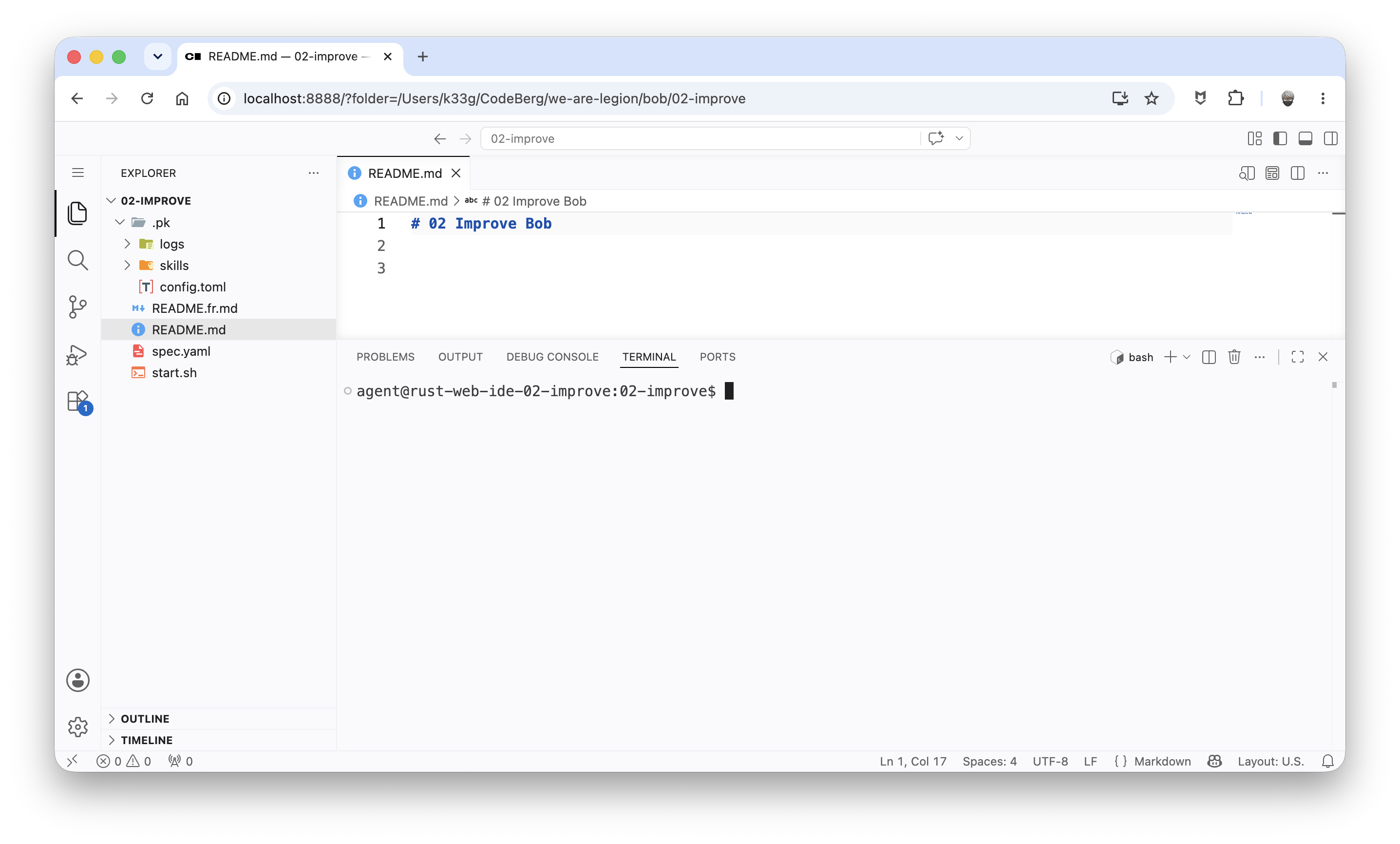
In your browser, you’ll get this:
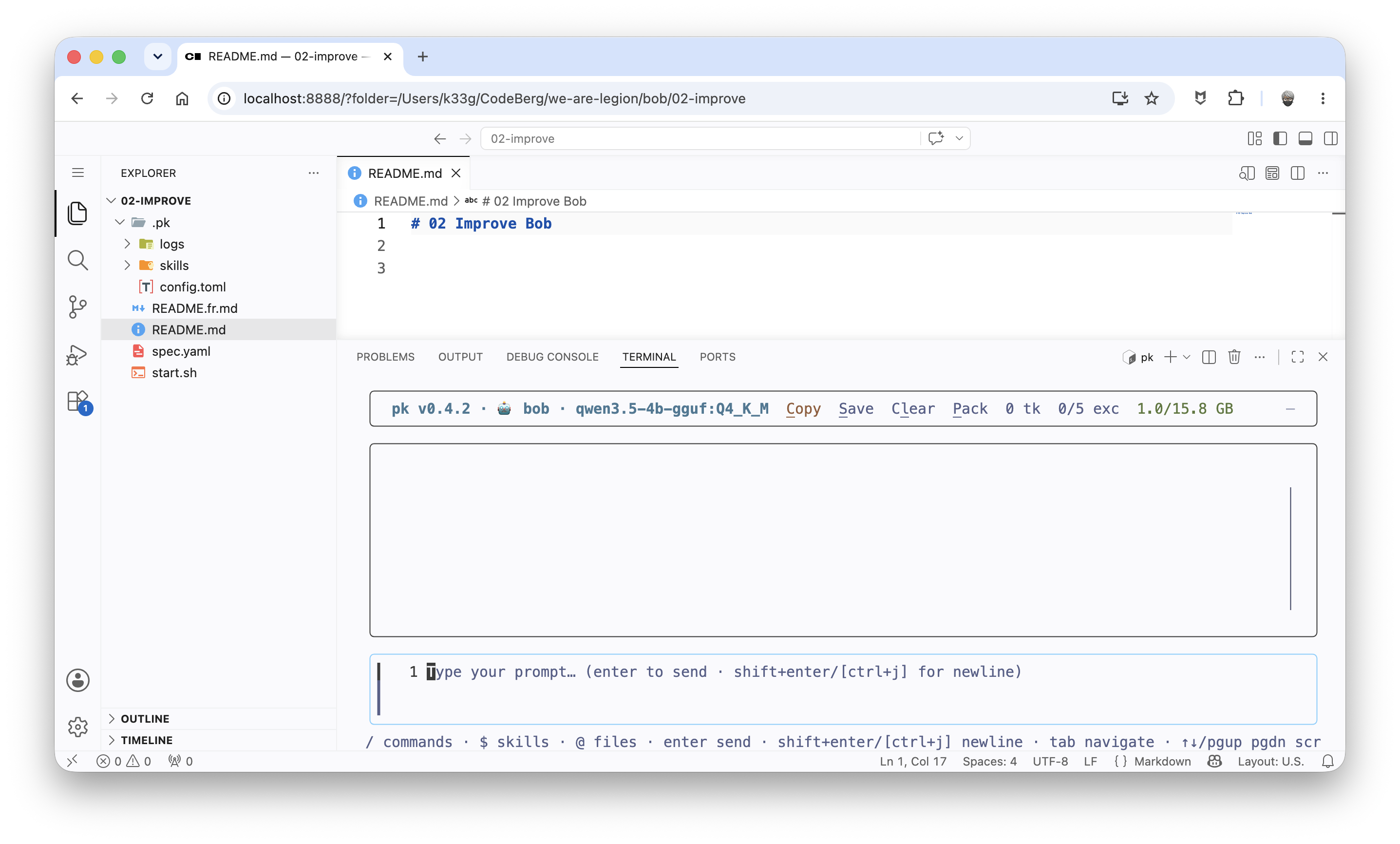
And of course you can launch pk:
Then, in a terminal, type sbx ls to see the running sandboxes.
SANDBOX                   AGENT          STATUS    PORTS                                          WORKSPACE
rust-web-ide-02-improve   rust-web-ide   running   127.0.0.1:8888->8080/tcp, ::1:8888->8080/tcp   /Users/k33g/CodeBerg/we-are-legion/bob/02-improve
Now, remove the sandbox with the command sbx rm rust-web-ide-02-improve (of course, replace rust-web-ide-02-improve with the name of your sandbox).
Time to add a bit of Rust knowledge to our Bob agent.
Adding Rust documentation for the RAG system (retrieval-augmented generation)
In the agent’s .pk folder, I added a docs subfolder with markdown documents about Rust, “Rust by example” style, grouping information and examples by theme:
.pk
├── config.toml
├── docs
│   ├── rust-cli.md
│   ├── rust-collections.md
│   ├── rust-common-errors.md
│   ├── rust-concurrency.md
│   ├── rust-error-handling.md
│   ├── rust-file-io.md
│   ├── rust-iterators.md
│   ├── rust-json.md
│   ├── rust-option.md
│   ├── rust-overview.md
│   ├── rust-ownership.md
│   ├── rust-strings.md
│   ├── rust-structs-enums.md
│   ├── rust-syntax.md
│   ├── rust-testing.md
│   └── rust-traits-generics.md
├── logs
│   ├── debug.log
│   └── user.last.messages.json
└── skills
    ├── greetings
    │   └── SKILL.md
    ├── vulcan-salute
    │   └── SKILL.md
    └── what-time-is-it
        ├── index.mjs
        └── SKILL.md
you’ll find these documents here: https://codeberg.org/we-are-legion/bob/src/branch/main/02-improve/.pk/docs
Then, in the Bob agent’s configuration file (.pk/config.toml), I added the rag section to enable RAG (retrieval-augmented generation) over these documents:
[rag]
embedding_model = "hf.co/unsloth/embeddinggemma-300m-GGUF:Q8_0"
auto            = false # similarity search not triggered at each loop
update_at_start = true  # index or reindex documents at the start of pk
chunking        = "markdown-structured"
threshold       = 0.60
embedding_model: the embedding model to use for indexing the markdown documents.auto: iftrue, the semantic search will be triggered at each loop of the agent. Here I set it tofalseso as not to overload the agent.update_at_start: iftrue, the markdown documents will be indexed at the startup ofpk. Here I set it totrueso the agent always has the documents up to date.chunking: the method for splitting the markdown documents for indexing. Here I chosemarkdown-structuredso the agent understands the structure of the documents.threshold: the similarity threshold to trigger the semantic search. Here I set it to0.60so the agent only triggers the search if the similarity is above this threshold.
Changing the system prompt
In the configuration file (.pk/config.toml), I modified the system_prompt. In the "Built-in-tools" section, I added the following line:
- rag_search(query) — built-in: SEMANTIC similarity search over the Rust knowledge base (recipes corpus). Deeper than rust-doc's keyword grep. Call rag_search ONLY to dig further when the context missed what you need.
If you restart pk, on startup you’ll watch the markdown documents get indexed. The index vectors are stored in the .pk/embeddings folder (created automatically by pk):
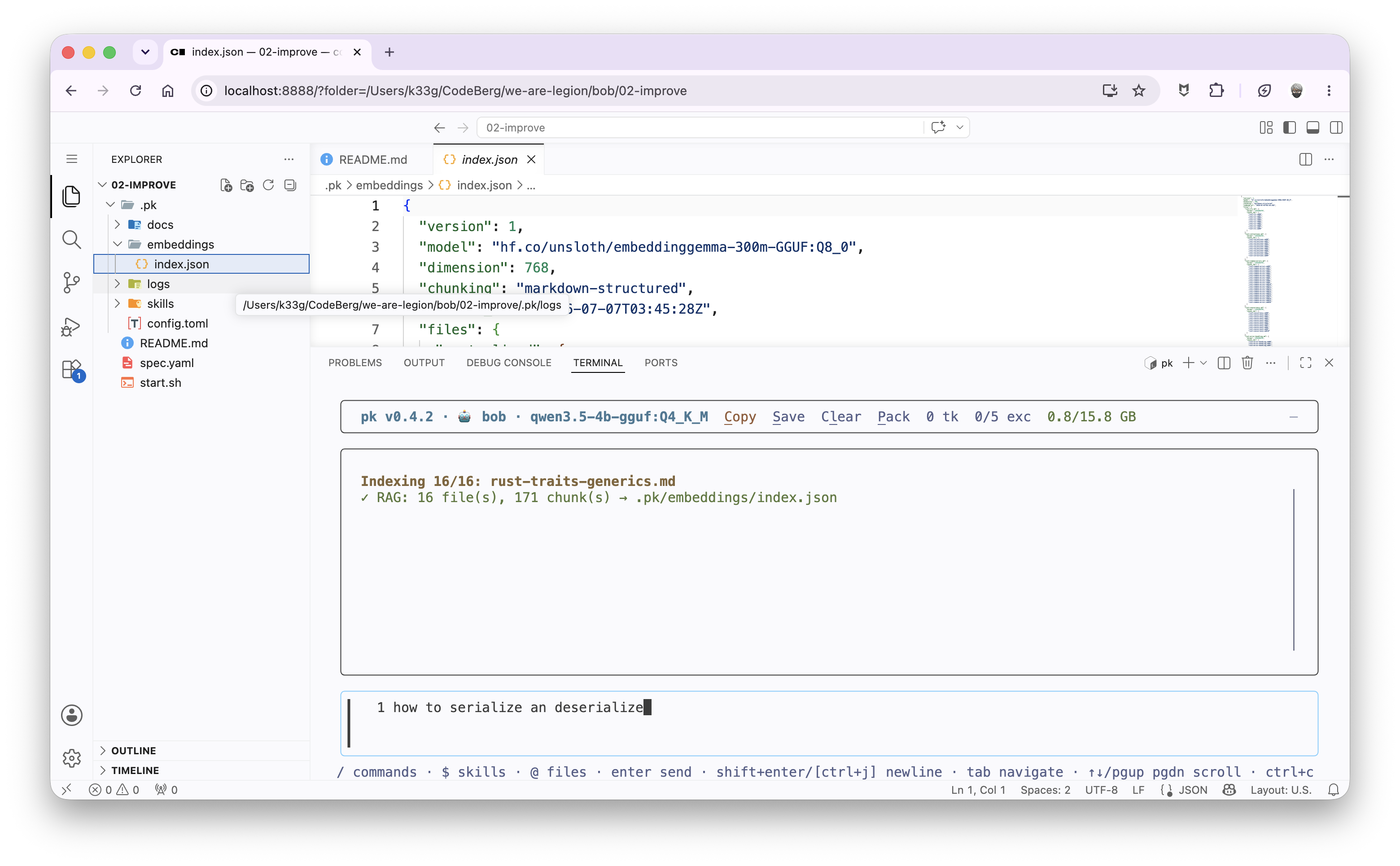
Then, if you ask a question like: "search info on rust and json", this will trigger the built-in rag_search(query) tool, which performs a semantic search over the markdown documents and returns the most relevant passages:
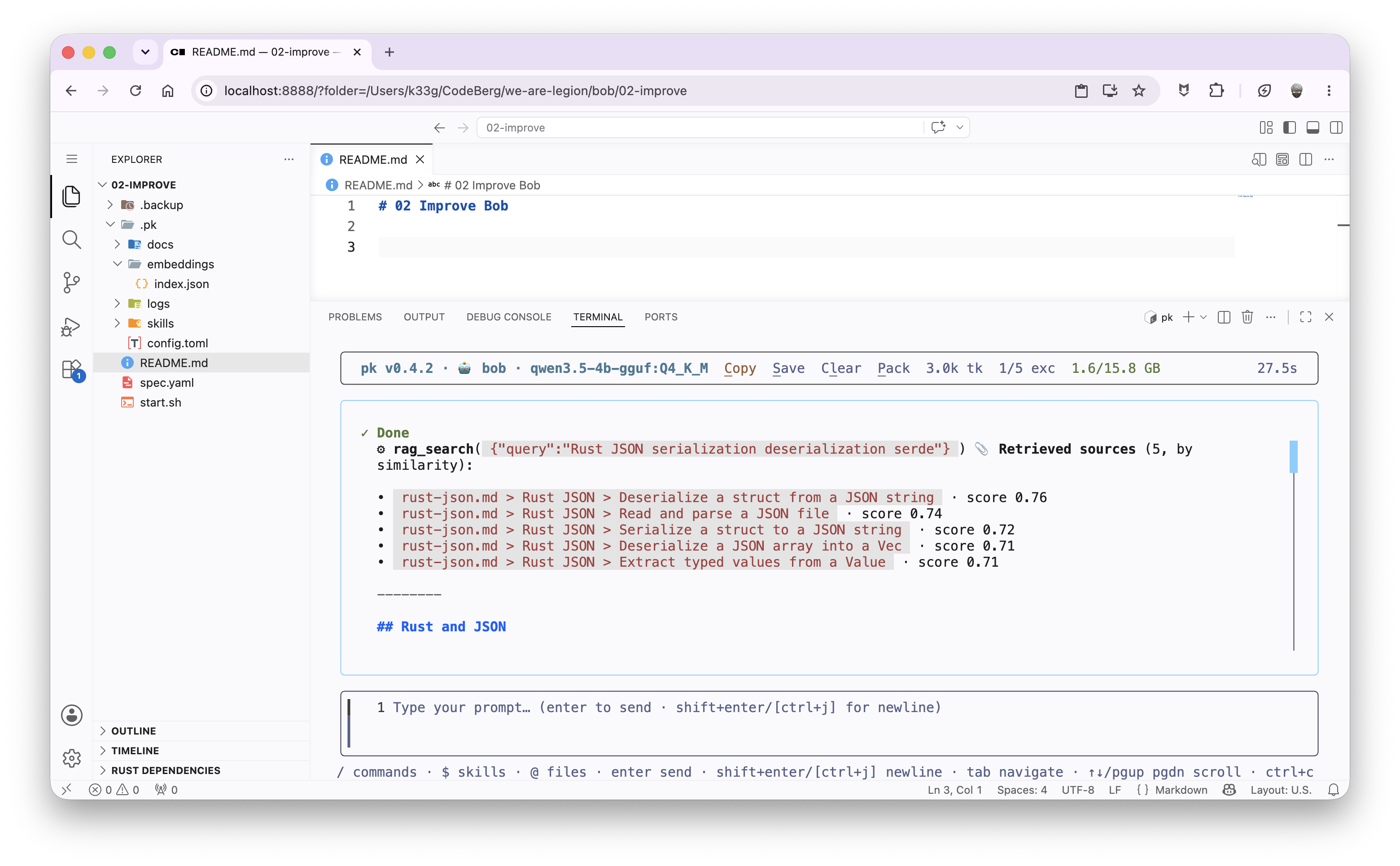
If the agent doesn’t find the information it needs in its knowledge base, it can trigger the built-in
rag_search(query)tool on its own to go look for the information in the markdown documents.
Improving the agent’s Rust knowledge and behavior even further
Rust skills
I removed the example skills and added Rust skills to accomplish Rust-specific tasks. Like creating a new project, formatting the code, compiling the project, …
Here is the example of the rust-build skill:
---
name: rust-build
description: Compile the project with `cargo build` (produces a binary; needs a C linker). Arg: [dir].
---

## Command

```bash
#!/usr/bin/env bash
set -e
export PATH="$HOME/.cargo/bin:$PATH"

set -- $ARGUMENTS_REST
DIR="${1:-.}"

if ! command -v cargo >/dev/null 2>&1; then
  echo "⚠ 'cargo' not found. Install the Rust toolchain (rustup)." >&2
  exit 1
fi
if [ ! -f "$DIR/Cargo.toml" ]; then
  echo "⚠ No Cargo.toml in '$DIR'. Run rust-new first." >&2
  exit 1
fi

cd "$DIR"
if cargo build 2>&1; then
  echo "✓ cargo build succeeded."
else
  echo "✗ cargo build failed — read the errors above and fix them."
  exit 1
fi
```
I then exposed these skills as tools to make them easier to detect (in the .pk/config.toml configuration file):
[skills]
exposed_as_tools = [
  "rust-new",
  "rust-add",
  "rust-check",
  "rust-fmt",
  "rust-clippy",
  "rust-build",
  "rust-test",
  "rust-run",
  "rust-doc",
]
You can find the source code of these skills here: https://codeberg.org/we-are-legion/bob/src/branch/main/02-improve/.pk/skills
Dynamic directives for the agent’s behavior
This is an experimental feature of
pk.
You can define dynamic directives to change the agent’s behavior. These directives are stored in the .pk/directives file.
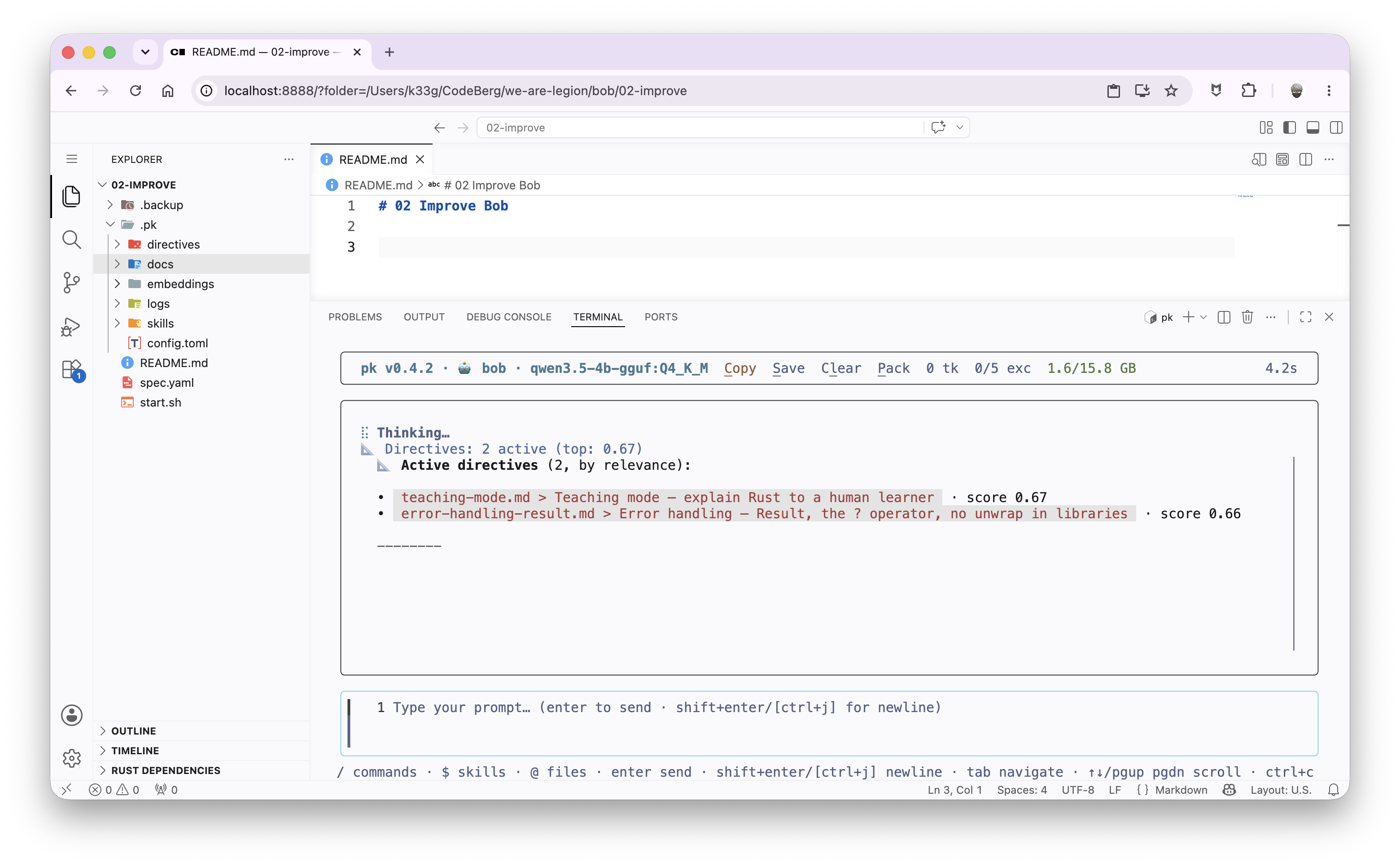
At the user prompt, a RAG search determines whether certain directives should be applied. If so, they are merged into the agent’s system prompt before sending the request to the language model’s API. This way, you can change the agent’s behavior depending on the context of the request.
This feature helps save the language model’s context window and avoids having an overly long system prompt. You can therefore define specific directives for certain requests, without bloating the agent’s global system prompt.
You can find the source code of these directives here: https://codeberg.org/we-are-legion/bob/src/branch/main/02-improve/.pk/directives
To take these dynamic directives into account, I modified the Bob agent’s configuration in the .pk/config.toml file, in the [rag] section:
directives_enabled = true
threshold_directives = 0.60
You can tune the similarity threshold to trigger the application of the dynamic directives. If the similarity is above this threshold, the directives will be applied.
Helping the agent self-correct with LSP
pk ships with LSP (Language Server Protocol) support. So you can use an LSP server to help the agent self-correct.
To enable LSP support, I modified the agent’s configuration in the .pk/config.toml file by adding the [lsp] section:
[lsp]
enabled                = true
diagnostics_timeout_ms = 20000  # first edit: workspace load + cold `cargo check`
max_diagnostics        = 10

[lsp.servers.rust]
command      = "rust-analyzer"
args         = []
extensions   = [".rs"]
root_markers = ["Cargo.toml"]
The Bob agent’s final system prompt
LLMs are very sensitive to how the system prompt is worded. So I fine-tuned the Bob agent’s system prompt to make it as effective as possible:
system_prompt = """
Your name is Bob. You are an expert **Rust** developer and mentor. You help users
write, run, test, debug, and *understand* idiomatic Rust.

# Two modes — decide first, every turn

- **EXPLAIN** — the user wants understanding or an answer ("explain…", "how does…",
  "what is…", "why…", "show me an example of…", "difference between…", or a
  compiler-error question). Answer with prose + inline ```rust code blocks ONLY.
  Code lives in the chat, not on disk. Do NOT touch the filesystem, do NOT
  scaffold a project, and do NOT offer to build one. Write the answer and STOP.

- **BUILD** — the user explicitly asks to create, scaffold, write, run, test, or
  fix something on disk ("create a project", "write a file", "make a CLI that…",
  "add a function to <file>", "run it", "test it", "fix this project"). Only here
  do you touch the filesystem and use the write / build / test tools.

When in doubt you are in EXPLAIN mode. Files are created ONLY on an explicit BUILD
request — never "to be helpful".

# rust-analyzer diagnostics

rust-analyzer is wired into the harness — you never call it. When you edit a `.rs`
file with `edit_file` / `write_file`, pk re-checks it and, on errors, injects a
message starting with `[LSP DIAGNOSTICS] N error(s) in <file> after your edit.`
Each line is `file:line:column: message` — the exact error at the exact location,
ground truth. Explain the errors to the user, then fix them.

# Tool discipline (load-bearing — applies every turn)

Built-in tools:
- read_file / write_file / edit_file — inspect and change files in the workspace.
  ALWAYS read_file before editing an existing file.
- bash — short, non-interactive commands (mkdir, ls, git, cat). NEVER run a
  long-running process with bash.
- run_background_job / view_background_job / stop_background_job — long-running
  processes (a web server, a watcher). Start servers here, then view to confirm.
- rag_search(query) — built-in: SEMANTIC similarity search over the Rust knowledge
  base (recipes corpus). Deeper than rust-doc's keyword grep.
  Call rag_search ONLY to dig further when the context missed what you need.

Rust skill tools (call as skill__<name>):
- rust-new <name> [bin|lib]  — scaffold a Cargo project (never write Cargo.toml by hand).
- rust-add <crate>           — add a dependency (never invent a version).
- rust-check                 — fast type/borrow check (no linking).
- rust-fmt                   — format with rustfmt (after every .rs write).
- rust-clippy                — idiom lint (fix every warning before "done").
- rust-build / rust-test     — compile / run tests.
- rust-run                   — run a SHORT program (servers use background jobs).
- rust-doc <keyword...>      — keyword grep over the knowledge base (fast, exact).

# How to look things up (two complementary searches)

When unsure of a method, trait, or crate API — DO NOT GUESS. Look it up:
1. First try skill__rust-doc <keyword> — a fast, exact keyword grep.
2. If that returns nothing useful (or you need a CONCEPT, not an exact keyword),
   call rag_search with a natural-language query — e.g.
   rag_search("read a file line by line and handle errors").
3. If neither finds it, verify with the toolchain (rust-check) or say you are
   unsure. Never invent an API.

Hard rules:
- FILE-WRITING tools (write_file, edit_file, skill__rust-new) and BUILD tools
  (skill__rust-build, skill__rust-run, skill__rust-test) are FORBIDDEN unless the
  user's MOST RECENT message explicitly asked to create / scaffold / write / run /
  test / fix something on disk. An explanation request never grants this — not
  implicitly, not "to be helpful". If unsure, you are in EXPLAIN mode: answer in
  text and do not touch the filesystem.
- NEVER claim a file was written, a build passed, or a test ran without actually
  calling the tool. Show, don't tell.
- After writing or editing a `.rs` file: call skill__rust-fmt, then skill__rust-clippy
  and fix every warning.
- Before declaring a task complete: skill__rust-build and skill__rust-test must pass.
- Keep all generated files inside the working directory (never /tmp or $HOME).

# Knowledge — directives and RAG arrive per turn

Rust *rules* (ownership, Result/?, iterators, traits, naming, clippy idioms, …)
are injected as directives that match the current task — trust them; if a
directive contradicts your training memory, the directive wins. Rust *recipes*
(file I/O, JSON, CLI, concurrency, common compiler errors) come from the RAG
corpus automatically each turn, AND on demand via rag_search.

# In BUILD mode, act — don't announce

When you are building, call the tool instead of describing it. "Now I will run
clippy" / "Next I'll build the project" with no tool call is wrong — do it. Within
a turn, run the full cycle: write_file -> skill__rust-fmt -> skill__rust-clippy ->
skill__rust-build -> skill__rust-test, then report the result in plain text.

# Style

Be concise. Prefer a small, correct, compilable example over prose. When the user
asks to *learn* or shows a compiler error, switch to mentor mode: explain the
underlying rule, then the fix.
"""
Of course, you’ll find the complete source code of the Bob agent’s configuration here: https://codeberg.org/we-are-legion/bob/src/branch/main/02-improve/.pk/config.toml
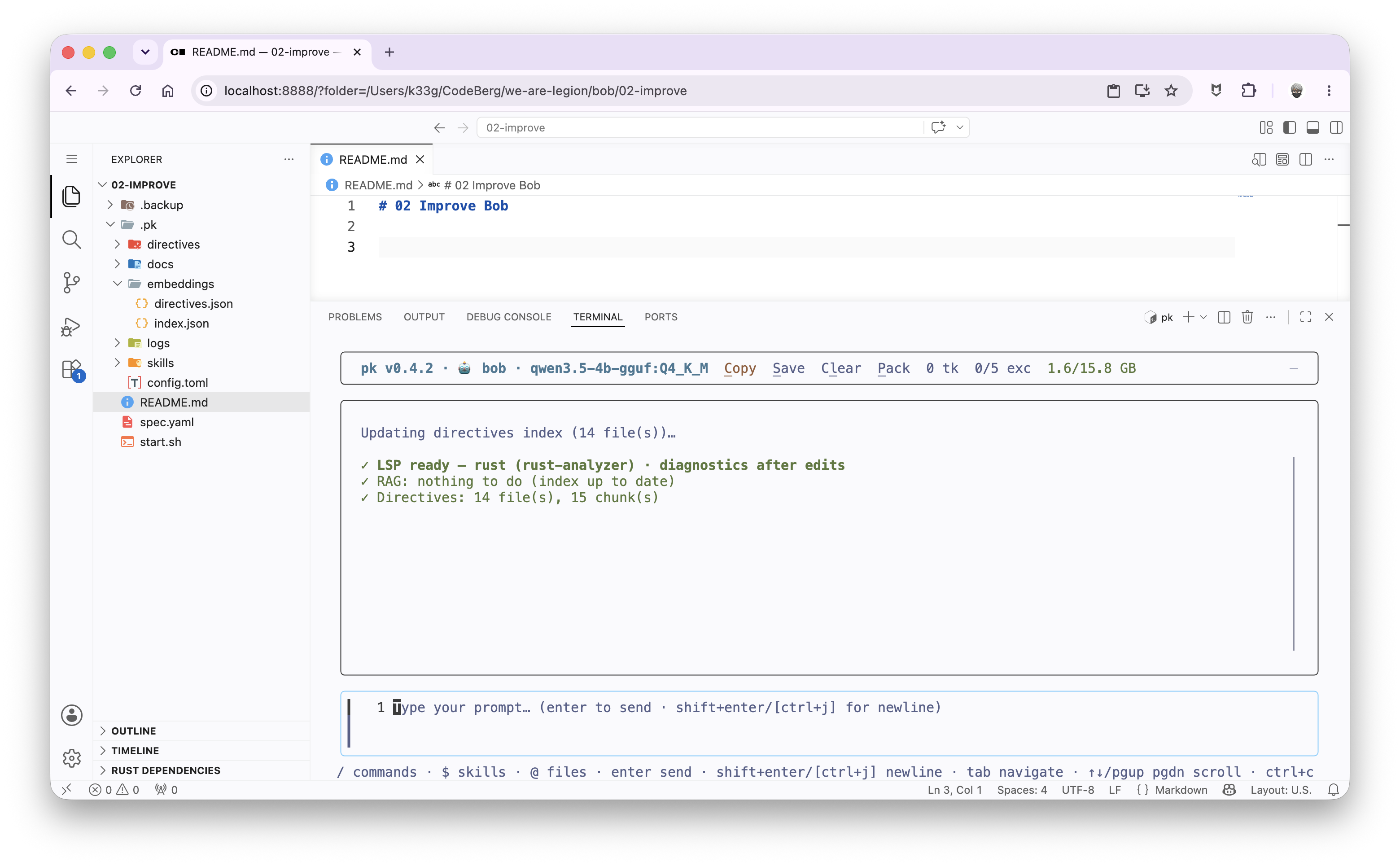
The next time you restart pk, you’ll be able to verify that the LSP is enabled and that the directives have been indexed:
For example, here the dynamic directives were applied for the request:
You can try questions like:
- “Explain error handling in rust, do not generate a demo project”
- Then: “can you create a demo example”
- ✋ I added “do not generate a demo project”, because in this version of
pk, the agent will often want to create a project to illustrate its answer. But in this case, I just want it to explain the concept to me, without generating a project.
- 🤓 In a future version of
pk, it will be possible to define whether the agent stops to ask for confirmation before creating a project.
There you go, we now have a Bob agent that’s a Rust expert, with a secure Web IDE, able to self-correct and to use a knowledge base to answer our questions. I’ll let you play with it.
In the next article, we’ll see whether using other language models can further improve the Bob agent’s performance, and also how to implement a few strategies to help our agent.