Preventing personal data (PII) from leaking to your LLMs — 100% local with Presidio, Docker Agent and Docker Model Runner
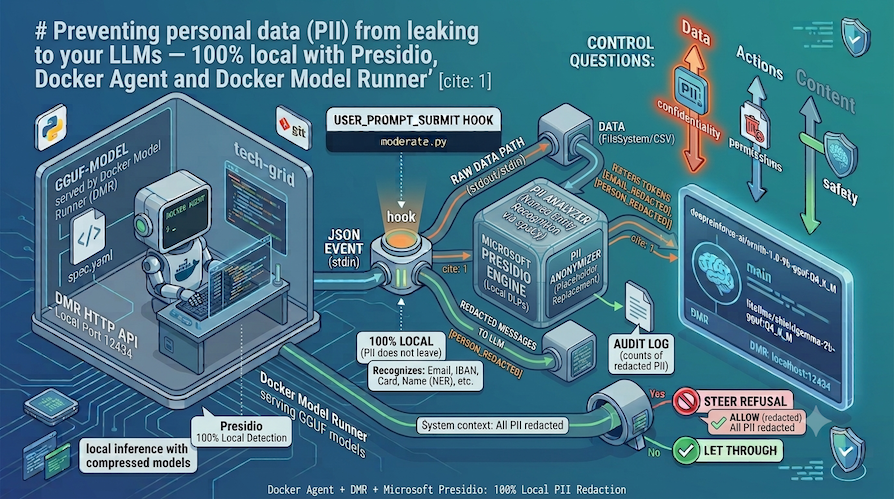
- The problem: as soon as an AI agent reads a file, PII (personally identifiable information: emails, IBANs, cards, names…) may travel to the model, that is, to its inference endpoint. If that endpoint is remote, the data leaves the machine and ends up with a third party.
- The solution here: a
docker agentwhere the model, even a local one, only ever sees, for example, a[EMAIL_REDACTED]. Detection is handled by Microsoft Presidio, also 100% local. Neither the content nor the PII to analyze leaves your machine.
📝 Reminder: PII: Personally Identifiable Information
This blog post is the 3rd in a series on data control and protection with an AI agent, using Docker Agent. The first two posts are:
- Controlling a local AI agent with Docker Agent hooks with ShieldGemma
- Controlling a local AI agent with Docker Agent hooks with Llama Guard 2
🌍 You can find the full source code for this demo in this Codeberg repository: https://codeberg.org/ai-guardrails-with-docker-agent/hooks-dmr-presidio.
The problem (recap): three things to control in an agent
An AI agent is not a simple completion call. It reads files, calls tools, sends messages to a model, and acts based on the responses. Each of these steps is a potential leak. Concretely, there are three axes to control:
- Data — what the model receives. If your agent reads
customers.csv, do the emails, IBANs, credit cards and social-security numbers really need to travel to the model? ✋ Careful: “travel to the model” means travel to its endpoint (the URL of the inference API the agent calls). If that endpoint is remote (a cloud LLM), the data physically leaves the machine and ends up with a third party: that’s where the leak becomes a real problem (retention, sub-processing, jurisdiction). With a local endpoint (herehttp://localhost:12434), the data doesn’t leave when the model is called, but it can leak afterwards: a local model is still a model — if it has seen the PII in clear, nothing stops it from reusing it in an action, like calling an HTTP tool, sending an email, writing to an external service, and thus exfiltrating it. This is the link with the actions axis: using local inference (a local LLM) is not enough. The only robust guarantee is that the model never sees the raw data; it can’t leak what it never received. Hence redaction before the model call. - Actions: what the agent is allowed to do (which tools, which files, which commands).
- Content: what goes in and out (toxic prompts, jailbreaks, inappropriate responses).
This article focuses on the first axis: data confidentiality. And it pushes the requirement all the way: everything stays local.
Why local? Because the best confidentiality guarantee is that no data leaves at all. A remote model, even a “trusted” one, means trusting a third party, its retention, its hosting country. Same for cloud PII-detection services (DLP “as a service”): to detect PII, they… receive the PII. By keeping the model and the detector on the machine, you get a direct compliance and sovereignty argument: nothing leaves. This is especially relevant under GDPR (data minimization) or the EU AI Act.
📝 Reminder: DLP: Data Loss Prevention (sometimes Data Leak Prevention): a category of tools whose role is to spot sensitive data (PII, secrets, banking, health data…) and prevent it from leaving a perimeter: block it, mask it, or alert before it goes out in an email, an upload, an API call, etc. Presidio is the detection/anonymization building block of a DLP (which we’ll run ourselves, locally).
The key point of this blog post’s demo: we’ll combine two systems running locally:
- the LLM with Docker Model Runner
- the PII detection engine with Presidio, using Docker Compose.
What is Microsoft Presidio?
To redact PII, you first need to recognize it in free text. That’s exactly what Microsoft Presidio does: an open-source framework for detecting and anonymizing personal data (PII, Personally Identifiable Information).
Concretely, Presidio answers two questions:
- Where is the PII?: an email, an IBAN, a credit card, an IP address, a phone number, or even a person’s name in a sentence. That’s the job of the analyzer service.
- What to replace it with?: mask, hash, encrypt, or (as here) substitute a typed token like
[EMAIL_REDACTED]. That’s the job of the anonymizer service.
What sets Presidio apart from a mere bunch of regexes:
- Recognizers with validation: a credit card is kept only if it passes the Luhn checksum, an IBAN only if it passes mod-97. Result: far fewer false positives than a “16 digits in a row” pattern.
- NER (named-entity recognition): thanks to an embedded spaCy model, Presidio detects people’s names — something no regex will ever do reliably.
- Extensibility: you can add your own recognizers (in our demo: the French NIR and French phone numbers) without rewriting the engine.
- A service architecture: Presidio is deployed as HTTP APIs. We run it locally via Docker Compose, so the PII to analyze never goes to a third-party service.
So this is the engine our Docker Agent hook will call every time some text is about to reach the model. What’s left is to figure out where to plug this call into the agent’s lifecycle.
- ✋ Note: spaCy is an open-source Python NLP (natural language processing) library. One of its flagship features is NER (Named Entity Recognition), i.e. spotting people’s names, places, organizations, dates, etc. in a sentence. To do this, spaCy doesn’t just use rules: it uses a pre-trained statistical model. It’s that model which, reading “I was charged by Emma Dubois”, infers that “Emma Dubois” is a
PERSON. By “embedded” we mean that this spaCy model is already included in the presidio-analyzer Docker image.
docker-agent and its hooks (recap)
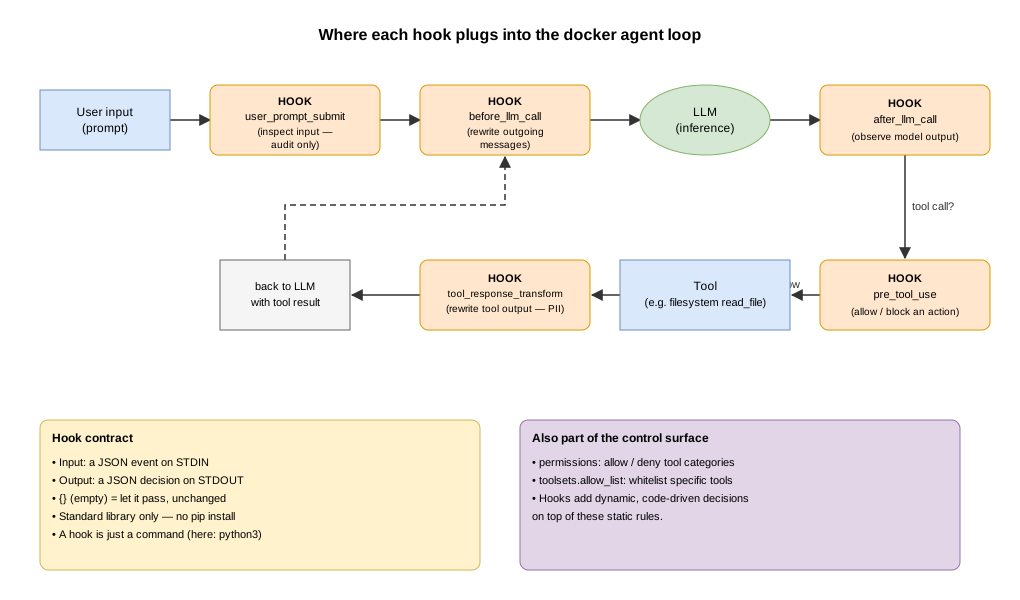
docker agent describes an agent in YAML: a model, an instruction, toolsets. Around the execution loop, docker agent exposes hooks: interception points where we plug in our own logic.
A hook is simply a command. docker agent sends it a JSON event on stdin and reads a JSON decision on stdout. Replying {} (empty object) means “let it through unchanged”. This demo’s hook uses only the Python standard library.
The key events, and what they let you control:
| Event | When | Can rewrite? | Controls |
|---|---|---|---|
user_prompt_submit |
at user input | ❌ (audit/context) | the user input |
before_llm_call |
just before the model call | ✅ (updated_messages) |
the outgoing messages to the LLM |
after_llm_call |
after the model response | observation | the model output |
pre_tool_use |
before a tool runs | ✅ (allow/block) | the agent’s actions |
tool_response_transform |
after a tool result | ✅ (updated_tool_response) |
tool outputs (e.g. PII) |
On top of that come static guardrails: permissions (allow/deny tool categories) and a toolset’s allow_list (expose only certain tools). Hooks add the dynamic, code-driven layer on top of these rules.
Diagram: where each hook plugs in
What we’re building here
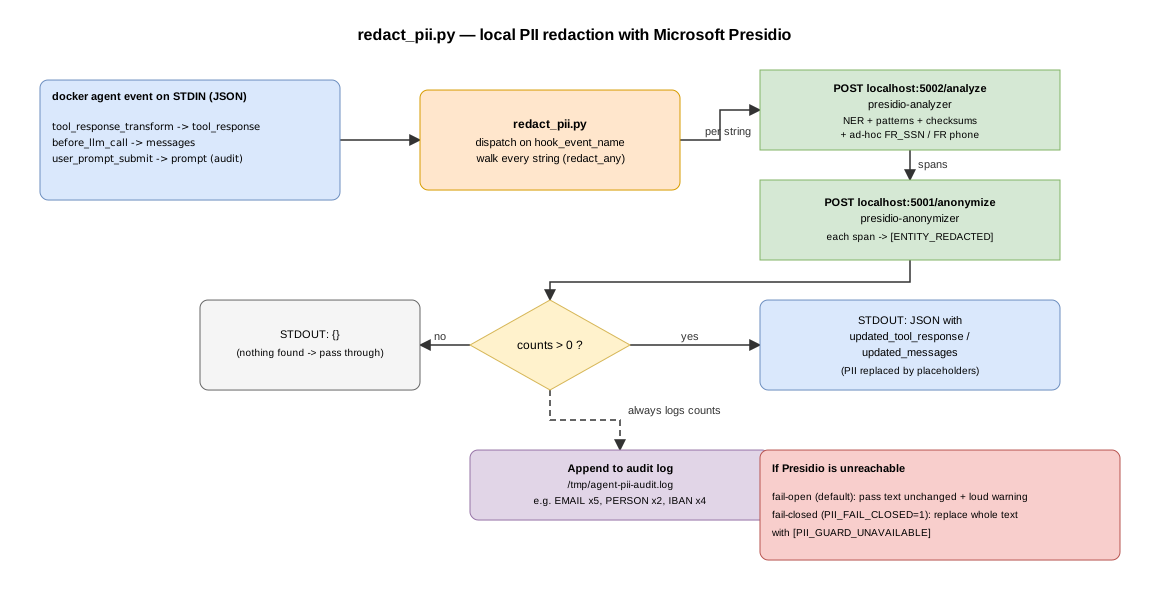
A single hook, hooks/redact_pii.py, wired on three events. Every time a string is about to reach the model, it sends it to Microsoft Presidio (analyzer + anonymizer, locally) to detect PII and replace it with typed tokens ([EMAIL_REDACTED], [PERSON_REDACTED], …). The local model then reasons on the tokens, never on the real values, and an audit log records what was redacted.
We could have used a “home-made regex” version, but Presidio is a real recognition engine: checksum validation (Luhn for cards, mod-97 for IBANs), phone-number parsing, and above all NER (named-entity recognition via spaCy) to detect people’s names, which a regex probably couldn’t fully do.
Diagram: the hook’s real flow
Project setup
Prerequisites: Docker Desktop + Model Runner enabled.
docker-agent version        # v1.103.0
docker model status         # Docker Model Runner must be running
python3 --version           # the hook uses ONLY the stdlib
# The agent's main model:
docker model pull huggingface.co/deepreinforce-ai/ornith-1.0-9b-gguf:Q4_K_M
Presidio, as two Docker Compose services (official Microsoft images):
docker compose up -d # analyzer :5002, anonymizer :5001
The compose.yaml file:
services:
  presidio-analyzer:
    image: mcr.microsoft.com/presidio-analyzer:latest
    ports:
      - "5002:3000" # host 5002 -> container 3000
    restart: unless-stopped

  presidio-anonymizer:
    image: mcr.microsoft.com/presidio-anonymizer:latest
    ports:
      - "5001:3000"
    restart: unless-stopped
The folder tree:
.
├── compose.yaml            # Presidio analyzer + anonymizer (official images)
├── pii-agent.yaml          # the agent + hook wiring + the local model (DMR)
├── hooks/
│   └── redact_pii.py       # calls Presidio over HTTP (stdlib only)
└── data/
    ├── customers.csv       # customer records full of PII
    └── support-ticket.txt  # a support message (perfect for PERSON)
Step-by-step through the redact_pii.py hook
1. The input/output contract
A docker agent hook reads JSON on stdin and writes JSON on stdout. The very first thing to do is parse the event and route on its name:
def main():
    raw = sys.stdin.read()
    try:
        data = json.loads(raw) if raw.strip() else {}
    except json.JSONDecodeError:
        emit({})            # unreadable input → don't break anything
        return

    event = data.get("hook_event_name", "")
emit() writes the object (or nothing) followed by a newline. Golden rule: when in doubt, emit {}: let it through rather than crash the agent loop.
2. Which entities we look for (and which we avoid)
Why do this: we want to redact PII, but not what’s needed for business data analysis, for instance. So in our case we do not request LOCATION, so that “France” survives and the question “how many customers in France?” stays computable.
LABELS = {
    "EMAIL_ADDRESS": "EMAIL",
    "PHONE_NUMBER": "PHONE",
    "CREDIT_CARD": "CREDIT_CARD",
    "IBAN_CODE": "IBAN",
    "IP_ADDRESS": "IP",
    "US_SSN": "US_SSN",
    "PERSON": "PERSON",
    "FR_SSN": "FR_SSN",
}
ENTITIES = list(LABELS.keys())
✋ Each Presidio entity type is mapped to a short label, used to build the placeholder [<LABEL>_REDACTED].
3. Extending Presidio without a custom image: ad-hoc recognizers
Presidio has no built-in recognizer for the French NIR (social-security number), and its phone recognizer may miss French numbers without a country code. Rather than building a custom image, we inject recognizers per request (a Presidio feature):
AD_HOC_RECOGNIZERS = [
    {
        "name": "fr_ssn_recognizer",
        "supported_language": LANGUAGE,
        "supported_entity": "FR_SSN",
        "patterns": [{
            "name": "fr_nir",
            "regex": r"\b[12]\s?\d{2}\s?\d{2}\s?\d{2}\s?\d{3}\s?\d{3}\s?\d{2}\b",
            "score": 0.9,
        }],
        "context": ["nir", "ssn", "sécurité sociale", "national_id"],
    },
    {
        "name": "fr_phone_recognizer",
        "supported_language": LANGUAGE,
        "supported_entity": "PHONE_NUMBER",
        "patterns": [
            {"name": "fr_local", "regex": r"\b(?:\+33|0)[1-9](?:[ .-]?\d{2}){4}\b", "score": 0.7},
            {"name": "intl", "regex": r"\+\d{1,3}[ .-]?(?:\d[ .-]?){7,12}\d", "score": 0.5},
        ],
        "context": ["phone", "tel", "mobile"],
    },
]
3b. Making names reliable: a deterministic deny-list
Why it’s necessary. The two recognizers above, like those for email, IBAN or card, rely on patterns: they are deterministic, a valid value is always caught. People’s names, however, go through spaCy’s NER, which is statistical and context-dependent. Consequence: NER misses names where it lacks context — on flat CSV, on an isolated first name in a signature, or on a prompt phrasing like using the name "Emma Dubois". That’s exactly what would leak “Emma Dubois” in clear to the model if we relied on NER alone.
The fix. When the threat model is “protect a known customer reference”, we can do better than NER: we load the names from a CSV (default data/customers.csv) and inject them as a third, deterministic PERSON recognizer. Those names are then redacted everywhere — prompt, tool output, prose — regardless of NER’s verdict.
# Load a deny-list of known names and add it to the ad-hoc recognizers.
# Disable with PII_NAME_DENYLIST="".
NAME_DENYLIST_CSV = os.environ.get("PII_NAME_DENYLIST", "data/customers.csv")


def load_name_terms(csv_path):
    """Each full name from the 'name' column + its tokens (>=3 chars, to catch
    an isolated first name like 'Emma'). Empty if file/column missing."""
    terms = set()
    if not csv_path or not os.path.isfile(csv_path):
        return terms
    with open(csv_path, encoding="utf-8", errors="ignore") as fh:
        rows = list(csv.reader(fh))
    if len(rows) < 2:
        return terms
    header = [h.strip().lower() for h in rows[0]]
    if "name" not in header:
        return terms
    idx = header.index("name")
    for row in rows[1:]:
        if idx < len(row):
            full = row[idx].strip()
            if len(full) >= 3:
                terms.add(full)
            for tok in re.findall(r"[A-Za-zÀ-ÿ]+", full):
                if len(tok) >= 3:
                    terms.add(tok)
    return terms


_name_terms = load_name_terms(NAME_DENYLIST_CSV)
if _name_terms:
    # Full names first (priority over tokens). Presidio applies IGNORECASE
    # by default, so "Emma" also matches "emma".
    _pattern = r"\b(?:" + "|".join(
        re.escape(t) for t in sorted(_name_terms, key=len, reverse=True)
    ) + r")\b"
    AD_HOC_RECOGNIZERS.append({
        "name": "known_names_denylist",
        "supported_language": LANGUAGE,
        "supported_entity": "PERSON",
        "patterns": [{"name": "known_name", "regex": _pattern, "score": 0.85}],
    })
Since this entry is added to AD_HOC_RECOGNIZERS, it ships with every /analyze call (see the next step) — no other change needed.
👋 Scope and trade-off. Deterministic for names in the reference; a new name (absent from
customers.csv) falls back to NER (best-effort). Adding the tokens (“Emma”, “Martin”…) increases recall but may over-redact a token that’s also a common word (“Rose”, “Mark”…) — accept it according to your risk tolerance.
4. Calling Presidio: analyze then anonymize
Detection and replacement are two distinct services. We first call /analyze to get the spans, then /anonymize to replace them with our placeholders. Everything goes through urllib (no external dependency).
def redact_text(text):
    """Return (redacted_text, {label: count}) for a single string, via Presidio."""
    if not isinstance(text, str) or not text.strip():
        return text, {}
    try:
        results = _post(f"{ANALYZER}/analyze", {
            "text": text,
            "language": LANGUAGE,
            "entities": ENTITIES,
            "ad_hoc_recognizers": AD_HOC_RECOGNIZERS,
        })
        if not results:
            return text, {}
        anon = _post(f"{ANONYMIZER}/anonymize", {
            "text": text,
            "analyzer_results": results,
            "anonymizers": ANONYMIZERS,
        })
    except (urllib.error.URLError, OSError, ValueError) as exc:
        # Presidio unreachable: fail-open (default) or fail-closed per env.
        audit("presidio_error", {"UNREACHABLE": 1}, extra=str(exc))
        if FAIL_CLOSED:
            return "[PII_GUARD_UNAVAILABLE]", {"BLOCKED": 1}
        return text, {}
    ...
📝 A span, here, is a segment of text detected as PII, located by its positions (start/end) in the string, its entity type, and a confidence score. Concretely, when
redact_pii.pysends text to/analyze, Presidio doesn’t return the modified text, it returns a list of spans, i.e. the “coordinates” of what it found:[ { "entity_type": "EMAIL_ADDRESS", "start": 8, "end": 32, "score": 1.0 } ]
The failure behavior is an explicit choice:
FAIL_CLOSED = os.environ.get("PII_FAIL_CLOSED", "").lower() in ("1", "true", "yes")
👋 Key point — fail-open vs fail-closed. By default, if Presidio is stopped, the text passes through unchanged (fail-open): handy so a demo isn’t blocked when compose isn’t running, but it’s dangerous in production. With
PII_FAIL_CLOSED=1, the hook replaces the whole text with[PII_GUARD_UNAVAILABLE]: no PII can slip through, even if the detector goes down. For production, enable fail-closed.
5. Recursing into the structures
This matters because the before_llm_call event receives a list of messages (nested dicts: Python dictionaries nested inside one another). We must redact every string, wherever it is.
def redact_any(value):
    """Recursively redact strings inside strings / lists / dicts."""
    if isinstance(value, str):
        red, c = redact_text(value)
        ...
    if isinstance(value, list):
        ...
    if isinstance(value, dict):
        ...
6. Event routing
Now, let’s talk about event routing: the same script serves all three hooks, but each event has a different output field. This is where each event’s rewrite capability comes in.
tool_response_transform: rewrites the tool result (the core of the protection). We do two passes: first a structural rule for known CSV columns (redact_csv_columns, detailed in the Limitations section — it makes name detection reliable on tabular data), then Presidio for everything else. The counts from both passes are merged for the audit:
if event == "tool_response_transform":
    resp = data.get("tool_response", "")
    if not isinstance(resp, str):
        resp = json.dumps(resp, ensure_ascii=False)
    # 1) Structural pass: redact known tabular columns (reliable on flat CSV,
    #    where NER-based PERSON detection is not). 2) Presidio for the rest.
    resp, counts = redact_csv_columns(resp)
    red, pcounts = redact_text(resp)
    for k, v in pcounts.items():
        counts[k] = counts.get(k, 0) + v
    audit(event, counts, f"tool={data.get('tool_name', '?')}")
    if counts:
        emit({"hook_specific_output": {
            "hook_event_name": event,
            "updated_tool_response": red,
        }})
    else:
        emit({})
    return
before_llm_call: rewrites the whole conversation (belt-and-suspenders; it’s the only hook able to rewrite the user’s own message):
if event == "before_llm_call":
    messages = data.get("messages") or []
    red_msgs, counts = redact_any(messages)
    audit(event, counts)
    if counts:
        emit({"hook_specific_output": {
            "hook_event_name": event,
            "updated_messages": red_msgs,
        }})
    else:
        emit({})
    return
user_prompt_submit: cannot rewrite the prompt (there is no updated_prompt field). We use it to audit and to inject a context reminder to the model:
if event == "user_prompt_submit":
    _, counts = redact_text(data.get("prompt", ""))
    audit(event, counts)
    if counts:
        kinds = ", ".join(sorted(counts))
        emit({"hook_specific_output": {
            "hook_event_name": event,
            "additional_context": (
                f"[PII guard] The user's message appears to contain PII "
                f"({kinds}). It will be redacted before the model call by "
                f"the before_llm_call hook. Never echo raw PII back to the "
                f"user; refer to it only via its [..._REDACTED] placeholder."
            ),
        }})
    else:
        emit({})
    return
7. Wiring in pii-agent.yaml
Finally, we wire the same script on the three events.
Note the
timeout: 60ontool_response_transform. The HTTP round-trips to Presidio (and the spaCy load on the first call) need a bit of headroom.
agents:
  root:
    model: local
    toolsets:
      - type: filesystem
    hooks:
      tool_response_transform:
        - matcher: "*"
          hooks:
            - name: redact-pii-in-tool-output
              type: command
              timeout: 60 # HTTP round-trips to Presidio; generous headroom
              command: python3 hooks/redact_pii.py

      before_llm_call:
        - name: redact-pii-in-outgoing-messages
          type: command
          timeout: 15
          command: python3 hooks/redact_pii.py

      user_prompt_submit:
        - name: audit-pii-in-prompt
          type: command
          timeout: 30
          command: python3 hooks/redact_pii.py

models:
  local:
    provider: dmr
    model: huggingface.co/deepreinforce-ai/ornith-1.0-9b-gguf:Q4_K_M
    base_url: http://localhost:12434/engines/llama.cpp/v1
    provider_opts:
      keep_alive: "30m"
👋 Watch out for relative paths:
commandhooks run from the launch directory. Keep thehooks/redact_pii.pypath relative, and launch the agent from the demo folder.
And now, how do we use all this?
Testing the hook in isolation (no model needed, only Presidio must run)
It’s the quickest way to see redaction at work. We craft a tool_response_transform event with the CSV content and read the output:
First, Presidio must be running (compose.yaml):
docker compose up -d
Then, we can test the hook on data/customers.csv:
jq -n --arg r "$(cat data/customers.csv)" \
  '{hook_event_name:"tool_response_transform", tool_name:"read_file", tool_response:$r}' \
  | python3 hooks/redact_pii.py | jq -r '.hook_specific_output.updated_tool_response'
Expected result: each PII column becomes a typed token — including all names (the name column is redacted by the structural pass, regardless of NER) — but France / Italy / USA remain, because LOCATION is not requested:
id,name,country,email,phone,iban,credit_card,national_id,last_login_ip
1,[PERSON_REDACTED],France,[EMAIL_REDACTED],[PHONE_REDACTED],[IBAN_REDACTED],[CREDIT_CARD_REDACTED],[FR_SSN_REDACTED],[IP_REDACTED]
2,[PERSON_REDACTED],France,[EMAIL_REDACTED],[PHONE_REDACTED],[IBAN_REDACTED],[CREDIT_CARD_REDACTED],[FR_SSN_REDACTED],[IP_REDACTED]
3,[PERSON_REDACTED],Italy,[EMAIL_REDACTED],[PHONE_REDACTED],[IBAN_REDACTED],[CREDIT_CARD_REDACTED],,[IP_REDACTED]
4,[PERSON_REDACTED],USA,[EMAIL_REDACTED],[PHONE_REDACTED],,[CREDIT_CARD_REDACTED],[US_SSN_REDACTED],[IP_REDACTED]
5,[PERSON_REDACTED],France,[EMAIL_REDACTED],[PHONE_REDACTED],[IBAN_REDACTED],[CREDIT_CARD_REDACTED],[FR_SSN_REDACTED],[IP_REDACTED]
End to end (with docker agent and its local model)
Of course, Presidio is still running, but this time we launch the full agent, with the local model. The hook will redact PII before the model sees anything.
Run the following command (and wait a bit while the model loads) to count the customers in France (the CSV is redacted, but the model reasons on the placeholders):
docker-agent run --exec pii-agent.yaml \
  "Read data/customers.csv and tell me how many customers are in France."
The read_file result arrives redacted by Presidio; the local model answers correctly (the CSV’s 5 rows give 3 customers in France) — reasoning only on the placeholders:
--- Agent: root ---
The user wants to know how many customers are in France from a CSV file. Let me read it first.

Calling read_file(path: "data/customers.csv")

read_file response → (
id,name,country,email,phone,iban,credit_card,national_id,last_login_ip
1,[PERSON_REDACTED],France,[EMAIL_REDACTED],[PHONE_REDACTED],[IBAN_REDACTED],[CREDIT_CARD_REDACTED],[FR_SSN_REDACTED],[IP_REDACTED]
2,[PERSON_REDACTED],France,[EMAIL_REDACTED],[PHONE_REDACTED],[IBAN_REDACTED],[CREDIT_CARD_REDACTED],[FR_SSN_REDACTED],[IP_REDACTED]
3,[PERSON_REDACTED],Italy,[EMAIL_REDACTED],[PHONE_REDACTED],[IBAN_REDACTED],[CREDIT_CARD_REDACTED],,[IP_REDACTED]
4,[PERSON_REDACTED],USA,[EMAIL_REDACTED],[PHONE_REDACTED],,[CREDIT_CARD_REDACTED],[US_SSN_REDACTED],[IP_REDACTED]
5,[PERSON_REDACTED],France,[EMAIL_REDACTED],[PHONE_REDACTED],[IBAN_REDACTED],[CREDIT_CARD_REDACTED],[FR_SSN_REDACTED],[IP_REDACTED]
)
Looking at the data, I need to count how many customers have "France" in the country column (which is the 3rd column). Let me check each row:

1. Row 1: France
2. Row 2: France
3. Row 3: Italy
4. Row 4: USA
5. Row 5: France

So there are 3 customers in France.
There are **3 customers** in France (rows 1, 2, and 5)
Another example for names is the support-ticket one (./data/support-ticket.txt) (NER shines on sentences):
docker agent run --exec pii-agent.yaml \
  "Open data/support-ticket.txt and summarize the customer's problem."
With a result like this:
--- Agent: root ---
The user wants me to open and read a file called "data/support-ticket.txt" and summarize the customer's problem. Let me read that file.

Calling read_file(path: "data/support-ticket.txt")

read_file response → (
Support ticket #4821 — Priority: High
--------------------------------------

From: [PERSON_REDACTED] <[EMAIL_REDACTED]>
Phone: [PHONE_REDACTED]
Account IBAN: [IBAN_REDACTED]

Message:
  Hi, I was charged twice on my card [CREDIT_CARD_REDACTED] last Tuesday.
  Please refund the duplicate. You can reach me at [PHONE_REDACTED] or by
  email. My last login was from [IP_REDACTED] if that helps.

  For identity verification my national ID is [FR_SSN_REDACTED].

Thanks,
[PERSON_REDACTED]
)
The user wants me to summarize the customer's problem from the support ticket. Let me identify the key details:

1. It's support ticket #4821 with High priority
2. Customer: [PERSON_REDACTED]
3. Problem: The customer was charged twice on her card last Tuesday and is requesting a refund for the duplicate charge
4. She provided contact details (phone, email)
5. She mentioned her last login was from a specific IP
6. She provided national ID for verification

I should summarize this clearly, noting all the redacted values remain as they are.
## Summary — Support Ticket #4821 (High Priority)

**Customer:** [PERSON_REDACTED]

**Problem:** The customer ([PERSON_REDACTED]) reports being **charged twice on her credit card** (`[CREDIT_CARD_REDACTED]`) last Tuesday. She is requesting a refund for the duplicate charge.

**Key details provided:**
- **Contact:** Phone `[PHONE_REDACTED]`, Email `[EMAIL_REDACTED]`
- **Account:** IBAN `[IBAN_REDACTED]`
- **Last login:** From IP `[IP_REDACTED]`
- **Identity verification:** National ID `[FR_SSN_REDACTED]`

**Action needed:** Investigate the double charge on her card and process a refund for the duplicate transaction.
This time, the name is redacted everywhere — including the isolated first name “Emma” in the signature (Thanks, then [PERSON_REDACTED]). The model therefore no longer sees any trace of the name, and its summary can’t reuse it.
Why it works. A first name alone, without sentence context, is not reliably recognized by spaCy’s NER (same limit as on CSV: NER needs context). What catches it here is the deny-list from step 3b: “Emma” is a token from data/customers.csv, so it’s redacted deterministically wherever it appears — header, signature, or prose.
📝 Without the deny-list, this signature “Emma” would leak (NER misses it) and the model would reuse it (“Customer: Emma”). This is precisely one of the cases that motivated the deny-list. To reproduce it:
PII_NAME_DENYLIST="" docker agent run pii-agent.yaml
⚠️ Trade-off (recall): redacting at the token level increases recall but may mask, everywhere in the text, a first name that’s also a common word (“Rose”, “Mark”, “Faith”…). A recall vs precision trade-off, to settle according to your risk tolerance.
For a name outside the reference (absent from customers.csv), we fall back to NER — you can then aim for better recall with a larger spaCy model or a French one: PII detection in different languages, Customizing the NLP engine in Presidio Analyzer.
Reading the audit log
You can read the audit log:
tail -f /tmp/agent-pii-audit.log
Each line summarizes the detected entities, per event:
[2026-07-16T05:34:12.920230+00:00] before_llm_call: PERSON×2
[2026-07-16T05:37:05.506344+00:00] tool_response_transform: CREDIT_CARD×1, EMAIL×1, FR_SSN×1, IBAN×1, IP×1, PERSON×1, PHONE×2 tool=read_file
[2026-07-16T08:04:04.240451+00:00] tool_response_transform: CREDIT_CARD×5, EMAIL×5, FR_SSN×3, IBAN×4, IP×5, PERSON×2, PHONE×5, US_SSN×1 tool=read_file
[2026-07-16T08:07:02.021729+00:00] tool_response_transform: CREDIT_CARD×5, EMAIL×5, FR_SSN×3, IBAN×4, IP×5, PERSON×2, PHONE×5, US_SSN×1 tool=read_file
[2026-07-16T08:07:02.229459+00:00] before_llm_call: PERSON×2
[2026-07-16T08:19:41.821194+00:00] tool_response_transform: CREDIT_CARD×5, EMAIL×5, FR_SSN×3, IBAN×4, IP×5, PERSON×5, PHONE×5, US_SSN×1 tool=read_file
[2026-07-16T08:20:56.039301+00:00] presidio_error: UNREACHABLE×1 <urlopen error [Errno 61] Connection refused>
[2026-07-16T08:20:56.039718+00:00] tool_response_transform: PERSON×5 tool=read_file
[2026-07-16T08:21:37.640544+00:00] tool_response_transform: CREDIT_CARD×5, EMAIL×5, FR_SSN×3, IBAN×4, IP×5, PERSON×5, PHONE×5, US_SSN×1 tool=read_file
[2026-07-16T08:23:07.755075+00:00] tool_response_transform: CREDIT_CARD×1, EMAIL×1, FR_SSN×1, IBAN×1, IP×1, PERSON×1, PHONE×2 tool=read_file
Checking what the model actually received
Since inference is local, Docker Desktop exposes the received requests: Docker Desktop -> Models -> .../ornith-1.0-9b-gguf -> Requests.
Otherwise you can also do this: capture the traffic to the model port during a run, then search for the exact values present.
# Terminal A: capture packets to the model (plain HTTP on loopback)
# ✋ On Mac:
sudo tcpdump -i lo0 -s0 -A 'tcp port 12434' -w /tmp/model.pcap

# On Linux:
#sudo tcpdump -i lo -s0 -A 'tcp port 12434' -w /tmp/model.pcap

# Terminal B: run the agent
docker-agent run --exec pii-agent.yaml \
  "Read data/customers.csv and tell me how many customers are in France."

# Terminal A: Ctrl-C, then search for the real PII in what went through
strings /tmp/model.pcap | grep -E 'emma.dubois@example.fr'
If you get zero matches, the values did not travel to the model for that run.
- Limit of
tcpdump: a large HTTP body is fragmented into several packets, and a value can be split across two packets, so agrepmay miss a leak. But it’s enough for a quick check.- For stronger proof, you’d want a recording proxy between docker agent and the model (and Docker Model Runner).
Now let’s test with the docker agent UI
Run:
docker-agent run pii-agent.yaml
Generate a cover letter for a Data Scientist position, using the name "Emma Dubois" and the email address "emma.dubois@gmail.com".
Results obtained (excerpt):
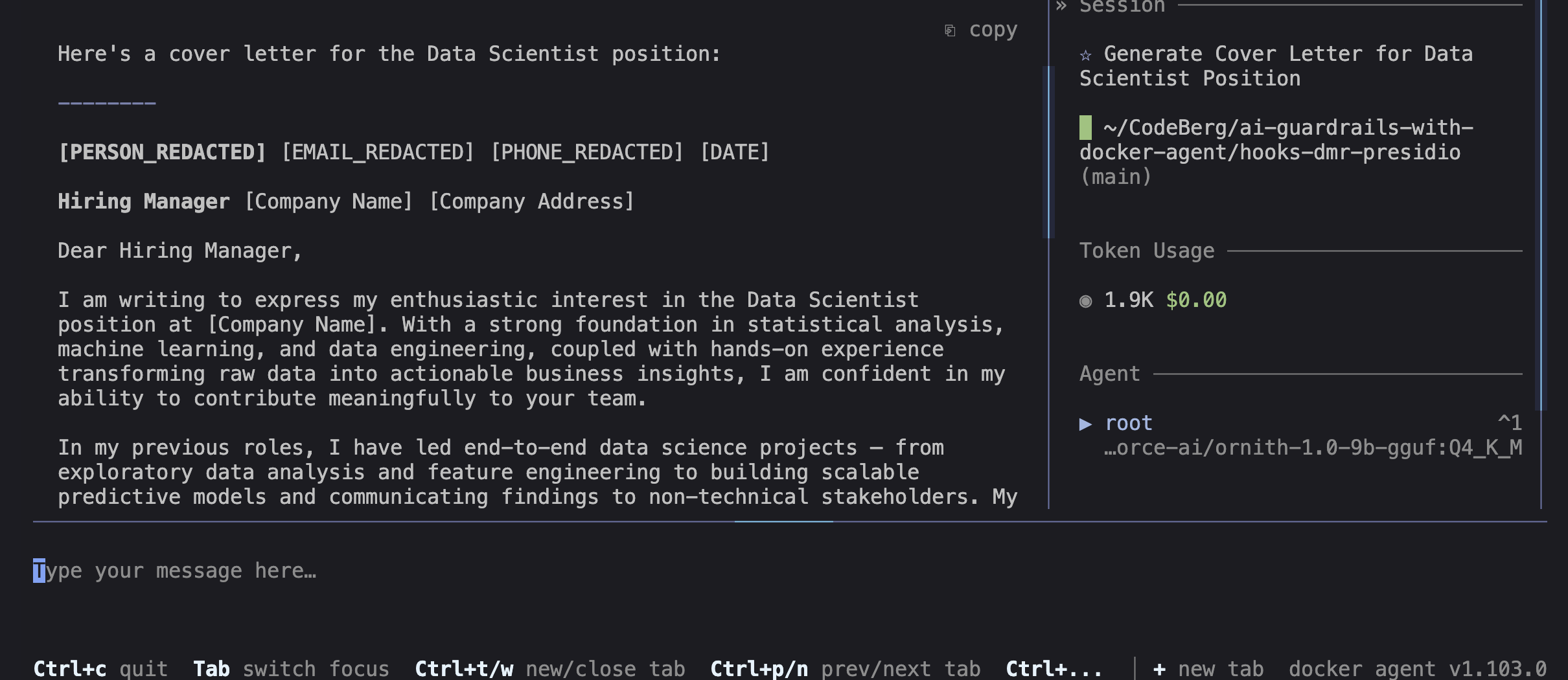
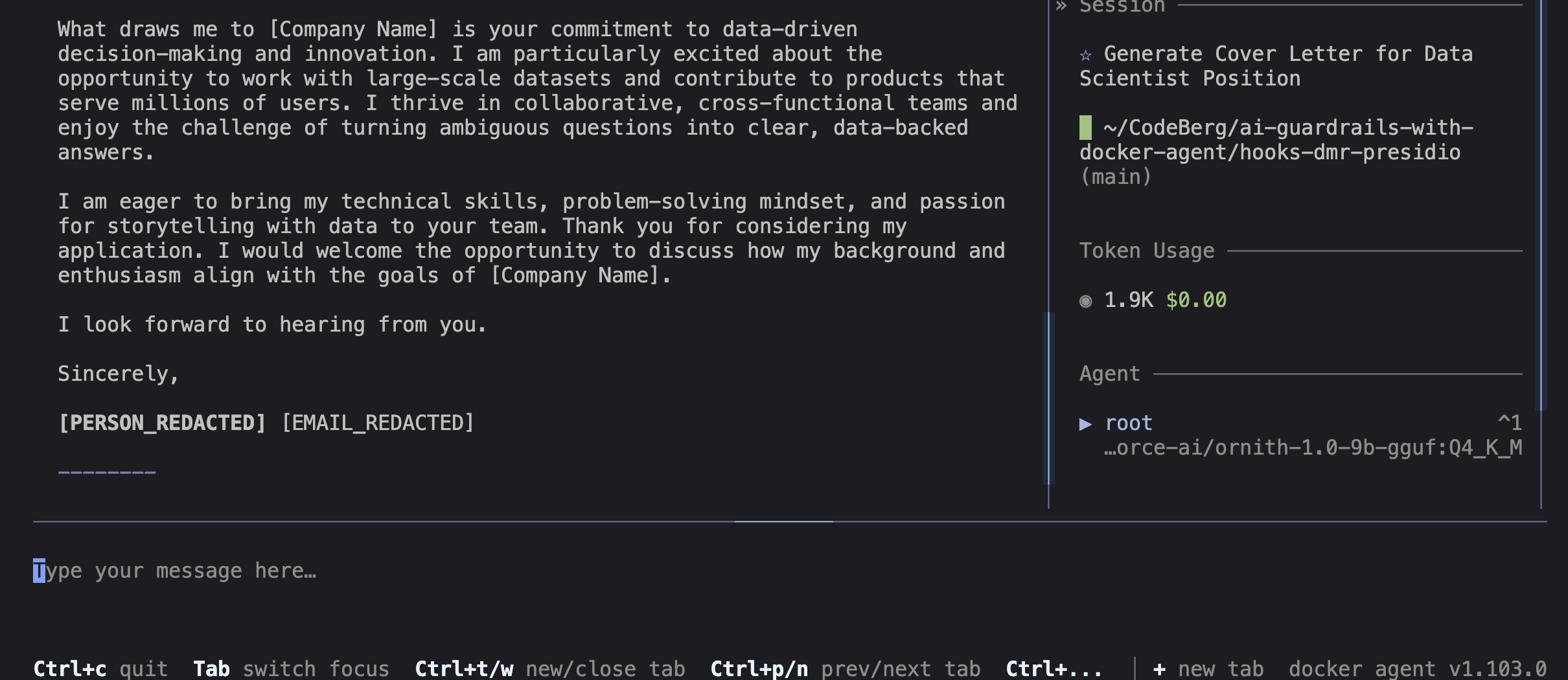
The name and the email are redacted — the model never saw “Emma Dubois” in clear. This is the role of the deny-list built at step 3b: “Emma Dubois” is in data/customers.csv, so it’s redacted deterministically, without relying on NER.
📝 Without the deny-list, this case would leak. The name is supplied in the prompt with a phrasing (
using the name "Emma Dubois") that spaCy’s NER misses; only the email (deterministic pattern) would be redacted, and “Emma Dubois” would reach the model in clear. To reproduce this leak, you can disable the deny-list:PII_NAME_DENYLIST="" docker agent run pii-agent.yamlThis is exactly why we set up the deny-list:
user_prompt_submitcannot rewrite the prompt, andbefore_llm_callrelies on NER for names — insufficient on its own.
You can run other tests to check that PII is properly redacted before reaching the model:
Read data/customers.csv and give me the list of the customers in France.Open data/support-ticket.txt and summarize the customer's problem.- Paste a fake email or name directly in your message: redacted by
before_llm_call.
Limitations
No solution is magic. What to accept:
- Presidio is stricter than regexes: it validates checksums: a card that fails the Luhn test, an IBAN that fails mod-97, or a bogus SSN like
123-45-6789are not redacted, because they aren’t “real” PII. It’s a strength (fewer false positives), but it forces checksum-valid demo data. - PERSON via NER: reliable on prose, best-effort elsewhere: spaCy’s NER relies on sentence context: excellent on the prose support ticket, but it may miss names on flat CSV (no context) and on some prompt phrasings. Emails/IBANs/cards, however, are detected by deterministic patterns, so they’re always caught. Deterministic reinforcements compensate for this weakness on known data, e.g. the name deny-list (built at step 3b).
- Latency: each string = two HTTP round-trips to Presidio, plus the spaCy load on the first call. Hence the generous
timeouts. - Fail-open by default: if Presidio is stopped, the text passes through unchanged. In production, enable
PII_FAIL_CLOSED=1.
Reinforcing the tabular case: redact by column
Same logic as the deny-list, but for CSV: on flat rows, a column’s position is more reliable information than NER. So the hook applies a redact_csv_columns pass before Presidio (see its wiring at step 6): if the tool result is a CSV whose header contains a known column, each cell of that column is redacted by position. A table declares the columns:
STRUCTURAL_CSV_COLUMNS = {
    "name": "PERSON",
}
Together, these two deterministic reinforcements (name deny-list + column rule) cover what we know; NER remains the net for what we don’t.
Conclusion
We’ve built a 100% local guardrail: a model served by Docker Model Runner, a PII detector (Presidio) running on Docker Compose, and a docker agent hook that redacts PII before the model sees it, all complemented by deterministic reinforcements (name deny-list, column rule). Nothing leaves the machine, neither the content nor the PII to analyze.
If you take a look in the repository’s
./toolsfolder, there’s a script to prove the absence of leaks (a recording “mini-proxy”).
It’s a first contact with docker agent hooks, and deliberately focused on a single axis: data confidentiality. We haven’t covered everything, and NER has its limits — we named them honestly. But the essentials are there: we already have good leads to secure an agent like docker agent, relying on its hook mechanism (user_prompt_submit, before_llm_call, tool_response_transform …) and on its static guardrails (permissions, allow_list).
In the previous blog posts, we saw how to work on the content axis with user-prompt moderation. We’ll soon see how to go further — controlling the agent’s actions (pre_tool_use). But the principle won’t change: docker agent provides the interception points; it’s up to you to define the policy.